Why Cheap Hosting Is Slow in India (Real Reasons + Fixes) [2026 Guide]
![Why Cheap Hosting Is Slow in India (Real Reasons + Fixes) [2026 Guide]](https://bestofguru.in/wp-content/uploads/2026/04/cheap-hosting-why-slow-explained.webp)
If you’re starting a new website for your business, choosing the right hosting plan is crucial. You can check this detailed guide on the best web hosting for beginners to avoid common mistakes.
But here’s the problem:
👉 Your website loads slowly
👉 Sometimes it even goes down
👉 And you’re wondering… “Why is this happening?”
You’re not alone.
In this guide, I’ll explain why cheap hosting is slow in India, what causes it, and most importantly, how you can fix it without spending a lot of money.
🚨 Why Cheap Hosting Is Slow in India (Quick Answer)
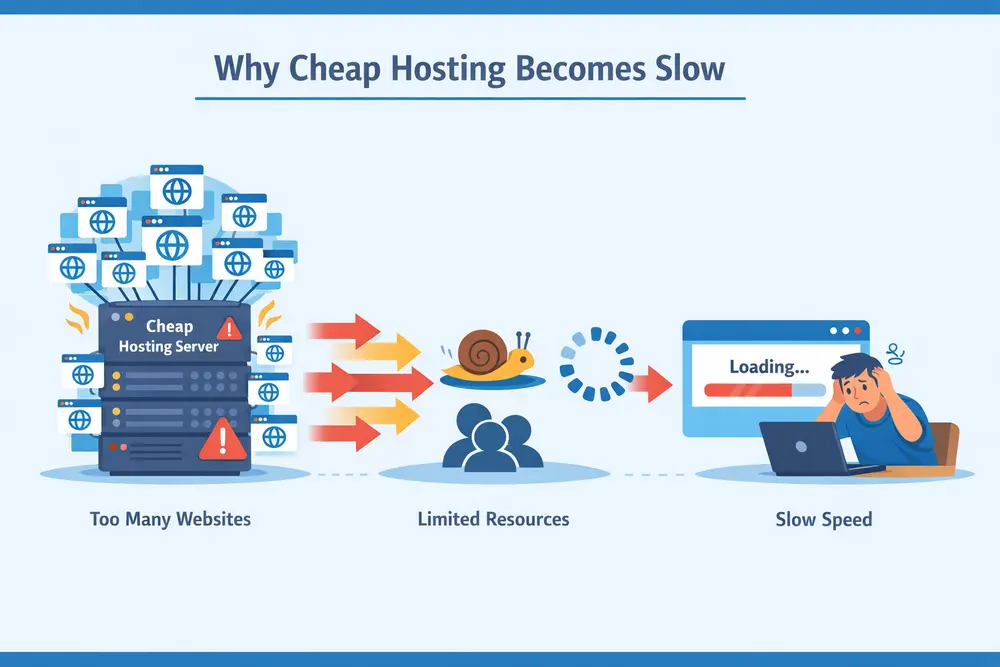
Cheap hosting is slow because:
- Too many websites share the same server
- Low-quality hardware and infrastructure
- No proper optimisation or CDN
- Data centres located far from India
👉 In simple terms:
You’re paying less, so you’re getting limited resources + crowded servers
Many beginners face these issues when choosing low-cost plans. If you’re unsure which option suits your needs, read which hosting is best for small websites.
🧠 Main Reasons Why Cheap Hosting Becomes Slow
Let’s break this down in a simple way 👇
1. 🧱 Overloaded Servers (Biggest Reason)
Most cheap hosting plans use shared hosting.
That means:
👉 1 server = 500 to 2000 websites
So when:
- Many sites get traffic at once
- Some sites use heavy resources
👉 Your website becomes slow automatically
2. ⚙️ Low-Quality Infrastructure
Cheap hosting providers cut costs by using:
- Old hardware
- Limited RAM
- Slower CPUs
👉 Result:
- Slow response time
- Delayed loading
This is something most beginners don’t realize.
3. 🌍 Data Centre Location Issues
Many cheap hosting companies:
- Don’t have servers in India
- Use US or Europe data centres
👉 So when someone visits your site from India:
- Data travels a longer distance
- The page takes more time to load
4. 🚫 No CDN or Optimisation
A CDN (Content Delivery Network) helps speed up your website.
But cheap hosting often:
- Doesn’t include CDN
- Doesn’t optimise server performance
👉 This directly affects:
- Page speed
- User experience
5. 📉 Poor Resource Allocation
Cheap plans usually come with:
- Limited CPU usage
- Limited bandwidth
- Hidden restrictions
👉 Even if your traffic is low, your site can still lag.
📉 How Slow Hosting Affects Your Website
You might think:
“It’s okay, my site is small”
But slow hosting can seriously hurt you 👇
❌ 1. Lower Google Rankings
Google considers page speed as a ranking factor
👉 Slow website = lower SEO rankings
❌ 2. Poor User Experience
Visitors will:
- Leave your site quickly
- Not come back
👉 High bounce rate = bad for growth
❌ 3. Lower Earnings
If you’re planning to:
- Do affiliate marketing
- Run ads
👉 Slow site = fewer clicks + less revenue
🧪 My Observation Using Cheap Hosting
From real beginner experience:
- Initial speed is okay
- After a few weeks → site becomes slower
- During peak times → noticeable lag
👉 Especially true for:
- Ultra-cheap plans under ₹100
- Overcrowded hosting providers
🔧 How to Fix Slow Hosting (Without Spending Too Much)
Good news 👇
You don’t need expensive hosting to fix this.
If you’re currently using budget hosting, make sure you’re selecting from reliable providers. Here’s a comparison of best cheap web hosting in India under ₹100.
✅ 1. Use a Free CDN (Very Powerful)
Use:
- Cloudflare (free plan)
Benefits:
- Faster loading
- Global caching
- Better performance in India
✅ 2. Optimize Images
Large images slow down your site.
👉 Use:
- Compressed images
- WebP format
✅ 3. Use Lightweight Themes
Heavy themes = slow loading
👉 Choose:
- Simple, fast WordPress themes
- Avoid unnecessary design elements
✅ 4. Install Caching Plugin
Caching reduces server load.
👉 Use plugins like:
- WP Fastest Cache
- LiteSpeed Cache (if supported)
✅ 5. Limit Plugins
Too many plugins = slow site
👉 Keep only:
- Essential plugins
- Remove unused ones
✅ 6. Choose Slightly Better Cheap Hosting
Not all cheap hosting is bad.
👉 Some providers offer:
- Better performance
- Less overcrowding
💡 Best Cheap Hosting That Is Still Fast
If you’re on a budget, choose wisely.
Look for:
- Indian or nearby servers
- Good uptime
- Positive user experience
👉 Instead of going for the absolute cheapest, choose value-for-money hosting
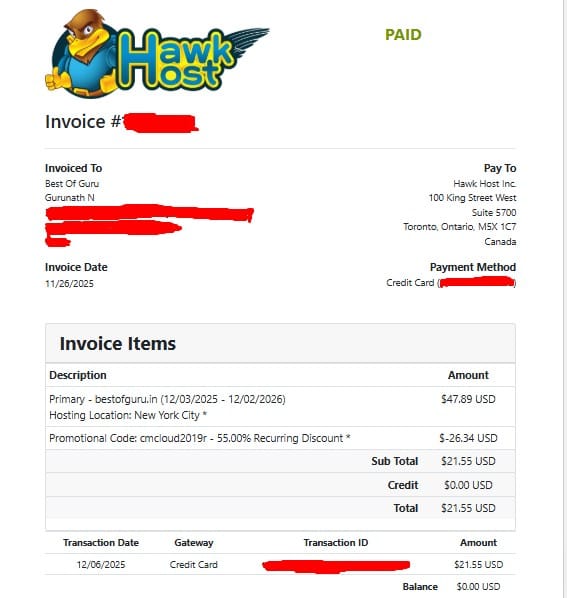
For example, after testing, I found some providers perform better than others. You can read my honest HawkHost review to understand its real performance. Here is the proof that I have been using Hawkhost Webhosting since 2019 for all my websites, and I have not had any major issues to date!
🤔 Is Cheap Hosting Worth It?
✅ YES, if:
- You are a beginner
- Your traffic is very low
- You’re testing blogging
❌ NO, if:
- Your site is growing
- You want faster rankings
- You care about user experience
🧠 Pro Tip (Very Important)
Start cheap… but don’t stay cheap forever.
👉 Upgrade when:
- Traffic increases
- Website grows
- Earnings start coming
If you’re confused between providers, this comparison of HawkHost vs Bluehost can help you decide.
🔗 Related articles
❓ FAQs
1. Why is my website slow even with low traffic?
Because cheap hosting limits server resources, not just traffic.
2. Does hosting affect SEO?
Yes. Page speed is a ranking factor, and slow hosting can hurt rankings.
3. Can I fix slow hosting without upgrading?
Yes, using: CDN, Caching, Optimisation
4. Which hosting is best for beginners in India?
Look for: Affordable plans, Good support, Reliable uptime
🏁 Final Verdict
Cheap hosting is slow in India mainly because of:
- Overloaded servers
- Poor infrastructure
- Lack of optimization
👉 But the good news is:
You can improve performance significantly with simple fixes. Before choosing any provider, I highly recommend checking this complete guide on the best web hosting for beginners to make the right decision.
🚀 Final Advice
- Don’t chase the cheapest option
- Focus on value + performance
- Optimise your site from day one