Shared Hosting vs Cloud Hosting: The Ultimate 2026 Guide to the Best Choice
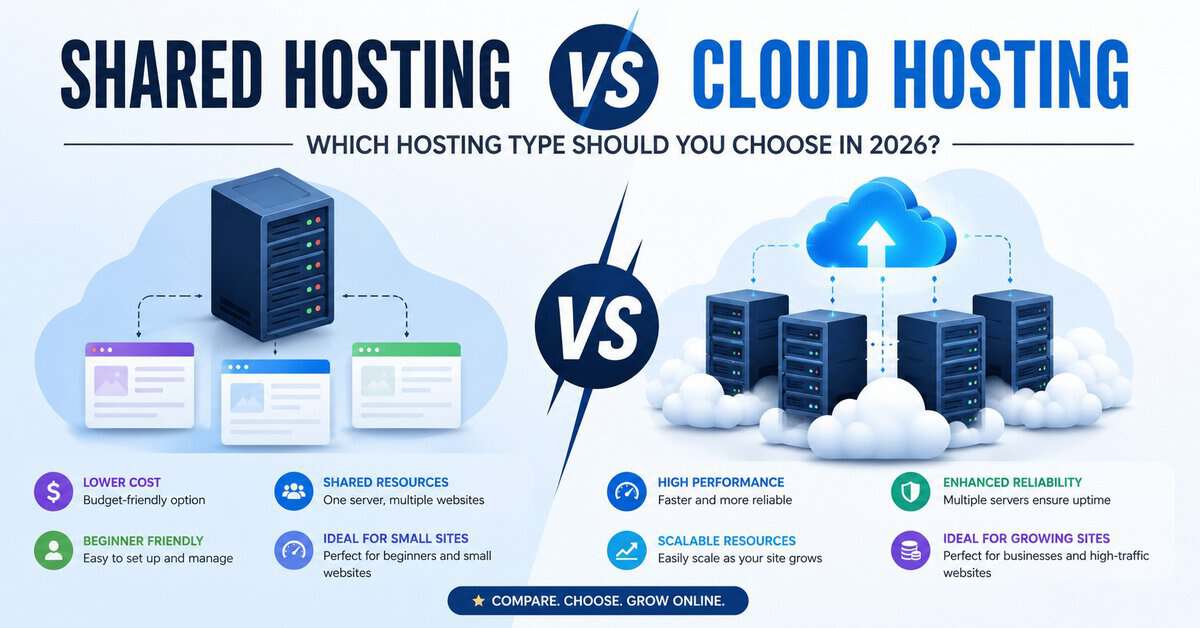
Starting a website or scaling an existing online business comes down to one critical infrastructure decision: where will your data live? The web hosting landscape has evolved rapidly, and the choice between shared hosting vs cloud hosting remains one of the most pivotal crossroads for webmasters, bloggers, and businesses alike.
In 2026, user experience, site speed, and Core Web Vitals directly dictate your SEO success and conversion rates. Choosing the wrong infrastructure can mean the difference between a lightning-fast user experience and a frustrated visitor hitting the back button.
When conducting a comprehensive shared hosting vs cloud hosting analysis, you must weigh your technical comfort level against your performance needs. Whether you are looking for the best hosting for beginners to launch a passion project or trying to decide which infrastructure can handle a sudden traffic spike without breaking a sweat, this deep-dive hosting comparison will break down everything you need to know.
Quick Answer: Shared Hosting vs Cloud Hosting
If you are short on time and need to make a quick decision on shared hosting vs cloud hosting, here is the bottom line:
- Choose Shared Hosting if: You are launching a new blog, a small portfolio, or a local business website with low-to-moderate traffic. It is the most budget-friendly option, requires no server administration knowledge, and is the absolute best hosting for beginners who need an all-in-one setup to get online quickly.
- Choose Cloud Hosting if: You run an e-commerce store, a fast-growing SaaS platform, a high-traffic media site, or any application where downtime means lost revenue. Cloud hosting offers unparalleled scalability, redundant data storage, and isolated resources that protect your site from neighbouring traffic spikes.
At-a-Glance Comparison
| Feature | Shared Hosting | Cloud Hosting |
|---|---|---|
| Primary Benefit | Extremely budget-friendly & easy to use | Highly scalable, reliable, & high performance |
| Resource Allocation | Shared with hundreds of other websites | Dedicated virtual resources across a cluster |
| Performance & Speed | Moderate (can suffer during peak server loads) | Fast, consistent, and optimized for speed |
| Uptime Reliability | Vulnerable to single points of failure | Near-perfect uptime due to server redundancy |
| Scalability | Fixed plans; requires manual upgrade | Instant, flexible scaling (pay-for-what-you-use) |
| Technical Curve | Beginner-friendly (built-in control panels) | Varies (ranges from user-friendly managed cloud to advanced unmanaged) |
| Best For | Beginners, small blogs, startup portfolios | E-commerce, high-traffic sites, scalable applications |
What Is Shared Hosting?

Shared hosting is an entry-level web hosting architecture where hundreds and sometimes thousands of websites reside on a single physical server. All of these websites share a collective pool of server resources, including Central Processing Unit (CPU) time, Random Access Memory (RAM), Solid-State Drive (SSD) storage space, and network bandwidth.
Think of shared hosting like renting a single bedroom in a massive apartment complex. You have your own private space (your website’s directory), but you share the main utilities, plumbing, and hallways (the server’s CPU, RAM, and network card) with all the other tenants. If someone down the hall uses too much water or hosts a loud party, your living experience can be directly impacted.
Because the hosting provider splits the operating costs of the physical hardware among hundreds of clients, it represents the budget end of the shared hosting vs cloud hosting spectrum, making it the absolute best hosting for beginners who want to get online without heavy upfront investments.
What Is Cloud Hosting?

Cloud hosting is a modern infrastructure model that breaks away from the limitations of a single physical machine. Instead of your website living on one server, it is deployed across a decentralised network of interconnected physical and virtual servers. This collective network is commonly referred to as “the cloud.”
In a cloud hosting environment, your website utilises a virtualised slice of resources drawn from a massive cluster of machines. If one physical hardware component fails, another server in the cluster instantly steps in to pick up the slack without causing downtime.
To use our housing analogy, cloud hosting is comparable to a decentralised network of high-tech condo rentals. If an issue occurs in your specific room, you are instantly shifted to an identical, perfectly functioning room down the hall without ever feeling the disruption. When comparing shared hosting vs cloud hosting, the cloud offers dedicated virtual environments, ensuring that neighbouring applications cannot hijack your performance.
How Shared Hosting Works
At its core, shared hosting relies on a single bare-metal server configured with a high-capacity operating system (usually Linux-based) and a web server software stack like Apache, Nginx, or LiteSpeed.
The hosting provider uses software tools to partition the server’s hard drive into isolated folders for each user. Each folder acts as a home directory for a different website’s files, databases, and media assets.
The Noisy Neighbour Effect
Because there is no absolute hardware virtualisation separating these accounts, the resources are managed on a first-come, first-served basis. If Website A experiences a massive, unexpected traffic surge or runs a poorly optimised database script, it can consume 90% of the entire physical server’s CPU and RAM.
As a result, Websites B, C, and D, which share that same server, suffer from severe latency, slow loading times, or complete server timeouts. While modern hosts use lightweight resource-throttling software (like CloudLinux) to mitigate this “noisy neighbour” effect, the structural limitations of sharing a single machine remain a major talking point in the shared hosting vs cloud hosting debate.
How Cloud Hosting Works
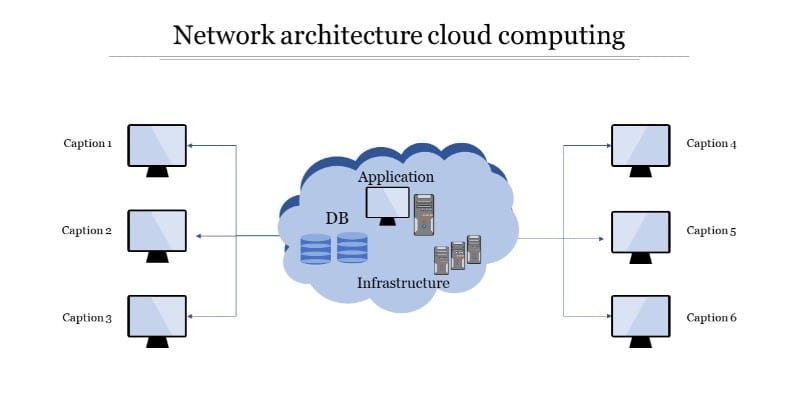
Cloud hosting relies on a technology known as virtualisation. Specialised software called a hypervisor abstracts the physical hardware resources of dozens of clustered servers and transforms them into a single pool of virtualised computing power.
Your website is hosted on a Virtual Private Server (VPS) instance within this cloud network. Rather than relying on a single hard drive or CPU core, your data is replicated across multiple storage areas (often using high-speed Storage Area Networks, or SANs).
Dynamic Load Balancing
When a user visits your cloud-hosted website, the network routes the incoming request to the most optimal, least-congested physical server within the cluster. If one physical node experiences a hardware failure or a sudden traffic spike, the load balancer shifts your site’s operational demands to an active node seamlessly.
This infrastructure provides highly consistent processing speeds, robust redundancy, and ensures that your site stays online even during localised hardware crises—a benefit that highlights why the core architectures of shared hosting vs cloud hosting are entirely different.
Shared Hosting vs Cloud Hosting: Key Differences
To understand which environment fits your needs, it helps to weigh their structural differences across core operational metrics.
Technical Comparison Table
| Core Metrics | Shared Hosting | Cloud Hosting |
| Server Architecture | Single physical machine | Distributed cluster of virtual servers |
| Resource Isolation | Low (resources pooled dynamically) | High (guaranteed virtual resources) |
| Uptime Guarantee | 99.0% to 99.9% | 99.99% to 100% |
| Traffic Handling | Up to 10,000–25,000 monthly visits | Millions of monthly visits |
| Root Access | Completely locked down | Available (on unmanaged options) |
| Backup Redundancy | Local server backups (vulnerable) | Multi-node mirroring (highly secure) |
Performance Comparison
When evaluating a shared hosting vs cloud hosting setup, performance comes down to raw speed, processing latency, and stability under load.
Page Speed and Time to First Byte (TTFB)
Shared hosting systems generally suffer from a higher and more erratic Time to First Byte (TTFB). Because the physical CPU must toggle between processing requests for hundreds of different sites simultaneously, a queue forms during busy hours. This results in sporadic page load times that can damage your Google Core Web Vitals scores.
Cloud hosting environments offer a remarkably low and stable TTFB. Your virtual instance has pre-allocated virtual CPU (vCPU) threads and dedicated RAM blocks that sit waiting exclusively for your site’s requests. Combined with high-performance solid-state arrays, cloud hosting processes dynamic PHP elements and database requests significantly faster than shared setups.
Peak Traffic Management
If your shared hosting site gets featured on a major news outlet or goes viral on social media, the sudden influx of concurrent users will likely exhaust your allotted memory limit, returning a “503 Service Unavailable” error.
Cloud environments are built specifically to absorb traffic spikes. They distribute the heavy traffic volume across the broader node cluster, maintaining fast speeds even when thousands of users browse your site at the exact same moment.
Scalability Comparison
Scalability dictates how easily your web infrastructure can grow alongside your business, and it is a defining metric in the shared hosting vs cloud hosting comparison.
Upgrading to Shared Hosting
Shared hosting is functionally rigid. When you hit the ceiling of your shared plan, your only path forward is to upgrade to a slightly higher tier within the same shared server, or manually migrate your entire file system to a completely different server environment (like a VPS or dedicated machine). This process requires technical migration, IP changes, and potential propagation downtime.
Instant Scaling in the Cloud
Cloud hosting offers vertical and horizontal scaling at the click of a button. If you run an e-commerce storefront and anticipate a 500% traffic increase during Black Friday, you can instantly scale up your vCPU and RAM allocations via your control panel.
Many cloud providers offer auto-scaling, which automatically provisions extra resources during high-traffic periods and scales them back down when traffic normalises. You pay only for the exact computing hours you consume.
Security Comparison
The architectural differences between shared hosting vs cloud hosting create entirely distinct security profiles.
Shared Hosting Risks
The biggest security challenge in shared hosting is server-wide contamination. If another website on your shared server uses an outdated, vulnerable WordPress plugin and falls victim to a cross-site scripting attack, the hacker can potentially exploit local server permissions to access the directory containing your files.
Furthermore, if a neighbouring site gets blacklisted for spamming or gets targeted by a Distributed Denial of Service (DDoS) attack, your site’s IP address may also be flagged, tanking your email deliverability rates and site accessibility.
Cloud Isolation
Cloud hosting mitigates these vulnerabilities by separating each account into its own containerised virtual environment. Even if a nearby virtual instance on the cloud network is compromised, the security breach is completely confined to that single container. Your site remains protected behind individual firewalls and isolated root environments.
Additionally, because data is distributed across multiple physical nodes, cloud hosting is naturally resilient against hardware-based data loss.
Pricing Comparison
For a business or an absolute beginner, infrastructure budgeting is critical when measuring shared hosting vs cloud hosting costs.
- Shared Hosting Financials: Shared hosting operates on a fixed, predictable monthly fee model. Because the cost of running the server is shared among thousands of users, plans are incredibly cheap, ranging from $2 to $10 per month. Providers frequently bundle free domain registration, free SSL certificates, and managed email accounts into this single price point.
- Cloud Hosting Financials: Cloud hosting pricing structures can be more complex. While managed cloud platforms offer predictable tiered flat rates starting around $10 to $30 per month, unmanaged cloud providers (like Amazon Web Services, Google Cloud, or DigitalOcean) use a utility billing model. You are billed granularly for data transfer bandwidth, storage read/write cycles, and hourly CPU consumption. While this is highly cost-effective for precise resource tracking, unoptimized sites or surprise traffic spikes can cause unexpected utility bills.
Why Many Beginners Choose the Wrong Hosting
The web hosting industry is highly competitive, and marketing campaigns frequently lead beginners down the wrong path when analysing shared hosting vs cloud hosting.
Many new webmasters fall into the trap of buying the cheapest shared hosting plan available, drawn in by promises of “unlimited traffic” and “unlimited storage.” In reality, the fine print in the Terms of Service (ToS) usually outlines restrictive Acceptable Use Policies. The moment a beginner’s site begins to gain organic traction, they receive an automated warning stating that their account is over-utilising CPU cycles, forcing an unexpected, hasty upgrade.
Conversely, some beginners buy into the hype of cloud hosting explained by online influencers and over-provision their infrastructure. They end up paying $50 a month for enterprise-grade cloud networks to run a basic personal blog that gets fewer than 500 visits a week. This unnecessary overhead drains resources that could have been better spent on content production, marketing, or design.
Who Should Choose Shared Hosting?
Shared hosting remains highly relevant and is the perfect operational match for specific types of web projects.
Recommended Use Cases
- New Bloggers and Content Creators: If you are launching a personal blog or a niche content site using WordPress, shared hosting gives you plenty of runway to find your audience.
- Local Small Businesses: Local service businesses (plumbers, dental clinics, local bakeries) whose websites act as a digital brochure with low daily traffic.
- Portfolio Sites: Designers, photographers, and freelance writers who need a static online résumé to show prospective clients.
- Testing and Staging: Developers looking for a cheap sandbox environment to test basic HTML/CSS/PHP code configurations before taking them live.
Who Should Choose Cloud Hosting?
Cloud hosting is non-negotiable for web assets where performance, high uptime, and security directly affect the bottom line.
Recommended Use Cases
- E-Commerce Stores: Digital storefronts (WooCommerce, Magento, Shopify headless setups) cannot afford slow page loads or downtime during checkout processes.
- SaaS and Web Applications: Custom software applications, member portals, and interactive web tools that require heavy server-side processing and database interactions.
- High-Traffic Media Platforms: News sites, online magazines, and viral content portals that regularly experience volatile shifts in visitor numbers.
- Corporate Enterprise Sites: Established businesses that need strict data compliance, robust security isolation, and a guarantee of 100% operational uptime.
When Should You Upgrade From Shared Hosting?
If you started your online journey on a shared plan, you must monitor your performance metrics closely to recognise when your site has outgrown its digital cradle and requires a shift to a modern shared hosting vs cloud hosting setup.
Signs It Is Time to Upgrade:
- Sustained Traffic Growth: Your site consistently hits over 25,000 to 30,000 monthly visitors.
- Sluggish Admin Dashboard: Your backend content management dashboard feels laggy or takes several seconds to save changes.
- Frequent 503 and 504 Errors: Your error logs reveal frequent resource exhaustion warnings.
- Expanding Asset Footprint: You are launching a complex plugin ecosystem or a membership tier that requires frequent database queries.
Our Recommendation for Beginners
If you are a true beginner launching your very first website, start with a high-tier shared hosting plan from a reputable provider.
Look for a host that offers a customised, intuitive dashboard (like cPanel or a clean proprietary control panel), automatic daily backups, a free SSL certificate, and 24/7 managed customer support. Starting here keeps your initial costs low and eliminates the need to learn complex server terminal commands.
As your traffic scales and you learn the ropes of web development and site management, you can easily execute a migration to a managed cloud hosting platform. This approach ensures your hosting expenditure scales naturally alongside your revenue and audience growth.
Frequently Asked Questions
Is cloud hosting faster than shared hosting?
Yes. Cloud hosting provides dedicated virtual processing resources and distributes visitor traffic across a cluster of servers, making it significantly faster and more consistent than shared hosting, which splits a single physical server among hundreds of sites.
Can I run WordPress on cloud hosting?
Absolutely. Most modern cloud hosting platforms offer managed WordPress solutions with one-click installers, staging environments, and server-level caching tailored specifically for WordPress databases.
Do I need technical skills to use cloud hosting?
It depends on the type. Unmanaged cloud hosting (AWS, DigitalOcean) requires server management skills and command-line knowledge. However, managed cloud hosting providers handle all the backend server configurations, updates, and security patches for you, making it as easy to use as traditional shared hosting.
Does web hosting affect my SEO?
Yes, dramatically. Google uses page speed and Core Web Vitals as direct search ranking signals. Slow loading times, high latency, and frequent downtime caused by an overloaded shared server can lower your search visibility.
Final Verdict
The battle between shared hosting vs cloud hosting isn’t about finding which option is universally superior; it’s about matching your project’s current maturity level with the correct infrastructure.
Shared hosting wins on cost-efficiency and pure ease of use, establishing itself as the best hosting for beginners. Cloud hosting wins on performance, bulletproof reliability, and endless scalability, making it the clear choice for professional web developers, growing e-commerce companies, and high-traffic online businesses.
Assess your budget, forecast your traffic realistically for the next six months, and choose the platform that provides the most stable foundation for your digital goals.