How to Get More Google Flow Credits for Free: What Actually Works
If you’ve started using Google Flow and suddenly noticed your credit balance disappearing faster than expected, you’re not alone.
Google Flow uses a credit-based system for AI video generation, so the number of clips you can create depends on your plan, the model you choose, and the type of generation you run. A few expensive generations can consume hundreds of credits surprisingly quickly.
The good news is that there are legitimate ways to get more Google Flow credits and, more importantly, make the credits you already have last longer. There are also plenty of misleading websites and videos claiming to offer unlimited or hacked Flow credits. Those are not legitimate ways to increase your balance.
This guide explains how Google Flow credits work, how many credits you currently receive, what different generations cost, how to access legitimate free credits, and how to avoid wasting your balance.
Google Flow Credits: Quick Answer
Google Flow credits are used to generate AI videos with Google’s Flow. In 2026, users without a subscription can receive 50 free credits per day, while paid Google AI plans provide larger monthly credit allowances. Credit usage depends on the model and generation quality—for example, Veo 3.1 Lite costs 10 credits, Fast costs 20 credits, and Quality costs 100 credits per generation for non-Ultra users.
If you want more Google Flow credits, the legitimate options include using the daily free allocation, checking eligible Google AI student offers, upgrading to a Google AI plan, purchasing additional credits where available, or accessing Flow through an eligible Google Workspace plan. Unused daily free credits do not roll over, so using them strategically can help maximize your available video generations.
What Are Google Flow Credits?
Google Flow is Google’s AI filmmaking and creative tool for generating and editing video. It uses Google’s generative AI models, including Veo, to create video from text, images, frames, and other creative inputs.
Flow uses credits to measure generation usage. The number of credits required depends on the model and generation type you select. Some requests can also create multiple generations, so the number of credits consumed can be higher than you might expect from a single prompt.
Your Flow and AI credits are shared across your Google account, regardless of which supported device you use. Google also provides a credit-usage area for eligible paid subscribers so you can see your remaining balance, refresh date, and usage history.
How Does the Google Flow Credit System Work?
Google Flow Credits by Plan
Google currently provides the following Flow credit allocations:
| Plan | Flow Credits | Refresh |
|---|---|---|
| Free / No Google AI subscription | 50 per day | Daily |
| Google AI Plus | 200 per month | Billing cycle |
| Google AI Pro | 1,000 per month | Billing cycle |
| Google AI Ultra ($100) | 10,000 per month | Billing cycle |
| Google AI Ultra ($200) | 25,000 per month | Billing cycle |
Google says these allocations can change, so check the current Flow or Google AI plan information before making a purchasing decision.
How Much Does Each Google Flow Generation Cost?
Different Flow models consume different numbers of credits. Google’s current published costs include:
| Model / Action | Current Credit Cost |
|---|---|
| Veo 3.1 Lite | 10 credits for non-Ultra users; 5 for Ultra |
| Veo 3.1 Fast | 20 credits for non-Ultra users; 10 for Ultra |
| Veo 3.1 Quality | 100 credits |
| Gemini Omni Flash – 4 seconds | 15 credits |
| Gemini Omni Flash – 6 seconds | 20 credits |
| Gemini Omni Flash – 8 seconds | 25 credits |
| Gemini Omni Flash – 10 seconds | 30 credits |
| Gemini Omni Flash video edit | 40 credits |
| 4K upscaling | 50 credits for Ultra users |
These are credits per generation, not necessarily per prompt or request. Google notes that some Flow features can produce multiple generations from one request. Always check the current credit cost shown in Flow before generating.
Do Free Google Flow Credits Work With Quality?
Yes. This is an important distinction from older descriptions of the free tier.
Google’s current documentation says users without Google AI Plus, Pro, or Ultra receive 50 free Flow credits per day and can use those credits for Veo 3.1 Lite, Fast, and Quality generations. However, a Quality generation costs 100 credits, meaning the 50-credit daily allocation alone is not enough to run one Quality generation in a single daily cycle.
So the free tier technically supports Quality, but the daily allowance limits how practically useful that option is.
Do Google Flow Credits Roll Over?
No. Unused free daily Flow credits do not roll over. If you receive 50 free credits and use only 20, the remaining 30 are not added to the next day’s allocation.
Paid monthly Flow credits also do not roll over. They refresh at the beginning of your billing cycle.
7 Legitimate Ways to Get More Google Flow Credits
There is no legitimate unlimited-credit generator or secret code. But there are several genuine ways to increase your available Flow usage or reduce how quickly your credits disappear.
1. Use the 50 Free Credits Every Day
If you don’t subscribe to Google AI Plus, Pro, or Ultra, Google currently provides 50 Flow credits per day at no charge.
If you use the full allocation every day, that represents up to 1,500 credits across 30 days. However, this is not a monthly pool: each day’s unused credits expire rather than accumulating.
Another important detail is that the daily refresh is triggered by your first generation. Google gives the example that using your credits for the first time on August 12 makes the next allocation available on August 13.
2. Check the Google AI Student Offer
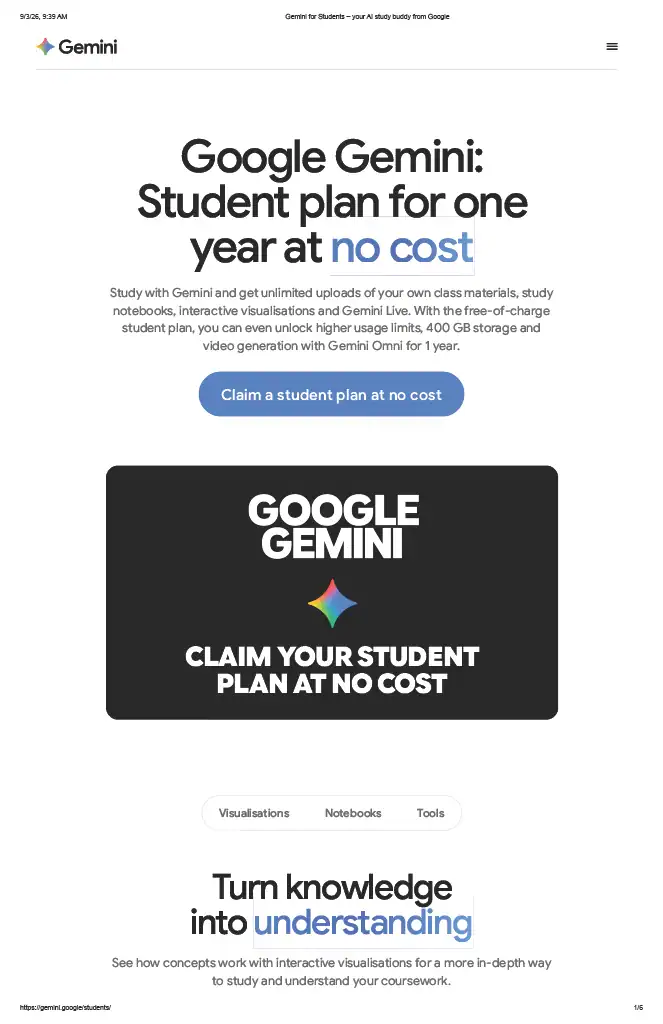
Eligible college and university students should check Google’s current student offer before paying for a Google AI plan.
Google’s current 2026 student promotion provides eligible students in the US with one year of Google AI Pro, while eligible students in 140+ countries receive one year of Google AI Plus at no cost. The offer is available for eligible students aged 18 and above and must be redeemed by December 31, 2026.
For students in India, Google’s current student page advertises the one-year Google AI Plus offer. The Indian offer includes higher Gemini usage limits, 400 GB of storage, video generation features, and other AI capabilities.
Because student eligibility and regional offers can change, verify the offer directly through Google’s student page before signing up. A valid payment method may also be required, and the subscription can automatically renew at the standard price after the promotional period unless cancelled.
3. Upgrade to a Google AI Plan
If you’re producing AI video regularly, a paid Google AI plan gives you a larger monthly Flow allocation.
Google AI Plus currently includes 200 Flow credits per month, Pro includes 1,000, and Ultra plans include 10,000 or 25,000 depending on the Ultra tier.
For serious creators, the biggest advantage isn’t simply the larger number. A monthly allocation makes it easier to plan a repeatable production workflow rather than depending entirely on a 50-credit daily allowance.
4. Buy Additional AI Credits Where Available
Google currently allows Plus, Pro, and Ultra subscribers to purchase additional AI credits in supported regions, with Japan excluded from this option according to Google’s Flow documentation.
This corrects an older assumption that upgrading your plan was the only way to obtain more credits. Availability, pricing, and expiration terms for purchased AI credits can vary, so check Google’s current purchase options before relying on them for a production workflow.
5. Check Your Google Workspace Access
If you use an eligible Google Workspace account, you may already have access to Google Flow without purchasing a separate consumer Google AI subscription.
Google currently lists qualifying Workspace plans including Business Starter, Business Standard, Business Plus, Enterprise Starter, Enterprise Standard, Enterprise Plus, G Suite Legacy Free Edition, Education Standard, Education Plus, and Google AI Pro for Education as having access to Flow with 50 daily credits.
Workspace access can depend on your organization’s configuration and administrator settings, so check with your administrator if Flow isn’t available on your work or education account.
6. Use Cheaper Models for Drafts
The most effective way to make your existing credits last longer is to stop using expensive models for experimentation.
For non-Ultra users, Veo 3.1 Lite costs 10 credits per generation, Fast costs 20, and Quality costs 100. That means one Quality generation can cost the equivalent of ten Lite generations.
Use Lite to test ideas, camera movements, compositions, and prompts. Move to Fast when you are happy with the creative direction, and reserve Quality for shots where the additional quality is genuinely worth the extra credits.
A Simple Credit-Saving Workflow
- Step 1: Write and refine the prompt before opening Flow.
- Step 2: Test the concept with Veo 3.1 Lite.
- Step 3: Fix composition, motion, and camera problems before upgrading the model.
- Step 4: Use Fast for promising versions that need better output.
- Step 5: Use Quality only for your final or hero shots.
- Step 6: Keep unnecessary experimentation away from expensive generations.
7. Check Your Credit Balance Before Every Session
Flow tells you when your credits are low or insufficient, but checking your balance before starting a production session is still a useful habit.
For paid subscribers, Google provides information about remaining credits, the next refresh date, and credit activity. To check your balance, open Google Flow and select your profile picture or account initial in the top-right corner. Your remaining credits appear under your profile information.
Can You Get Unlimited Google Flow Credits for Free?
No.
There is no legitimate third-party website, browser extension, credit generator, or secret tool that can simply add unlimited Flow credits to your Google account.
Flow usage and credit balances are controlled by Google’s systems. If a website claims that you can enter your Google account details and receive thousands of free credits instantly, treat that claim as a major warning sign.
Avoid These Fake Google Flow Credit Methods
Fake credit generators: Websites claiming to add Flow credits to your account have no legitimate way to modify Google’s server-side credit balance. They may instead be designed to collect information, display deceptive advertisements, or distribute malicious software.
Browser extensions promising unlimited credits: Be especially careful with extensions requesting access to your Google account. An unofficial extension does not need your Google credentials to legitimately increase your Flow balance.
Services asking for your Google password or 2FA code: Never give your Google password, verification code, or authentication information to a third-party service claiming to provide Flow credits.
Modified or shared accounts: Accounts advertised as having unlimited credits or bypassed limits can expose you to account, privacy, and security risks.
“Watch ads for Flow credits” websites: Treat claims that Google officially rewards you with Flow credits for completing surveys, watching advertisements, or installing unrelated apps with skepticism unless the offer appears directly inside an official Google product.
How to Make Google Flow Credits Last Longer
Getting more credits is only half the solution. Efficient usage can have an even bigger effect on how much content you produce.
Start With Veo 3.1 Lite
Use the lowest-cost model that can answer the creative question you’re testing. If you’re only checking whether a prompt produces the right subject, movement, or composition, spending 100 credits on Quality is unnecessary.
Use Shorter Generations for Testing
Veo 3.1 Lite and Fast support 4-, 6-, and 8-second generations. When you’re validating an idea, a shorter clip can be enough to determine whether the prompt works.
Don’t Regenerate the Same Failed Prompt
If a generation repeatedly produces the wrong result, don’t simply press Generate again. Change the part of the prompt responsible for the problem: subject description, movement, environment, camera direction, lighting, or composition.
Prepare Prompts Before Spending Credits
A strong prompt can save several generations. Before generating, define the subject, action, environment, camera movement, framing, lighting, and desired visual style. The more of the creative decision-making you complete before spending credits, the less you need to experiment inside Flow.
Separate Drafting From Final Production
Think of Flow credits like a production budget. Exploration should be cheap. Final shots can be expensive.
A practical workflow is to generate several low-cost concepts, select the strongest one, refine the prompt, and then spend more credits on the final version.
Free vs Paid Google Flow Credits
| Feature | Free | Google AI Plus | Google AI Pro |
|---|---|---|---|
| Flow credits | 50/day | 200/month | 1,000/month |
| Credit rollover | No | No | No |
| Veo 3.1 Lite | Yes | Yes | Yes |
| Veo 3.1 Fast | Yes | Yes | Yes |
| Veo 3.1 Quality | Yes* | Yes | Yes |
| Credit activity history | No | Yes | Yes |
| Best for | Experimentation | Light use | Regular production |
*Quality is available to free users, but it costs 100 credits per generation, while the free daily allocation is 50 credits.
Which Google Flow Plan Is Best?
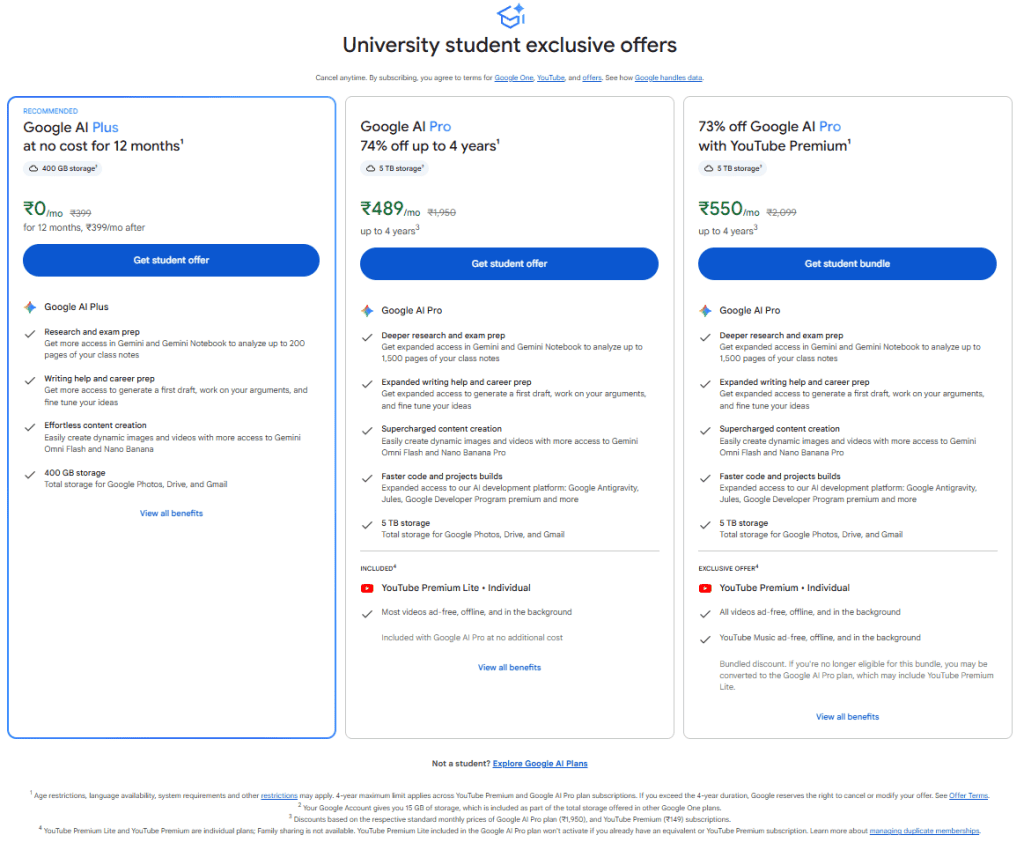
Choose the free tier if you’re learning Flow, experimenting with AI video, or producing occasional clips. The 50-credit daily allocation is useful if you consistently use it.
Consider Google AI Plus if you want a small monthly allocation and additional Google AI features but don’t need heavy Flow production.
Consider Google AI Pro if Flow is becoming part of your regular content-production workflow and 1,000 monthly credits better match your needs.
Consider Ultra only if you’re producing AI video at a much higher volume or specifically need the additional Ultra benefits and larger credit allocation.
Before paying, check whether you qualify for an official student promotion or another Google offer. Also remember that plan prices, benefits, and credit allocations can change.
How to Check Your Google Flow Credits
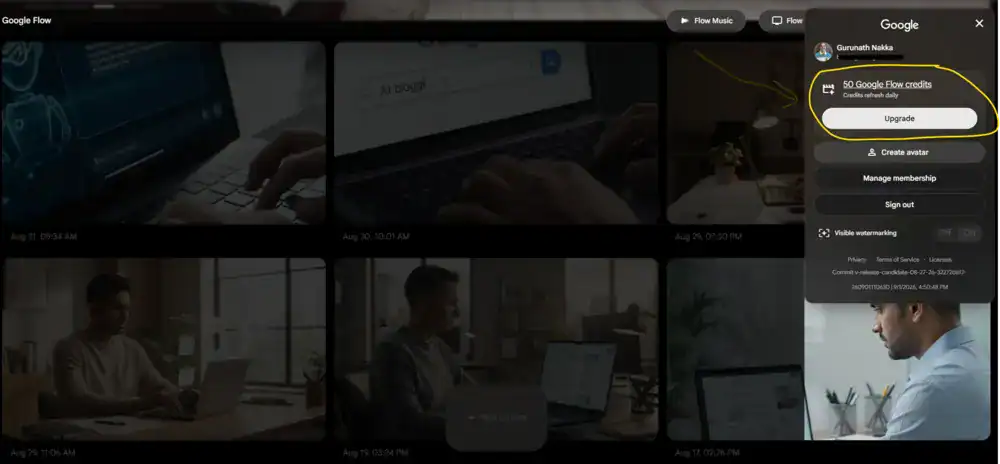
Checking your balance is simple:
- Open Google Flow.
- Sign in to your Google account.
- Select your profile picture or account initial in the top-right corner.
- Look under your profile information for your remaining Flow credits.
Paid Google AI Plus, Pro, and Ultra subscribers can also access credit activity information, including remaining credits, the next refresh date, and credit usage details.
Frequently Asked Questions
How many free Google Flow credits do I get per day?
Users without a Google AI Plus, Pro, or Ultra subscription currently receive 50 Google Flow credits per day at no charge. Unused daily credits do not roll over.
Do Google Flow credits roll over?
No. Free daily Flow credits and monthly subscription Flow credits do not roll over. Free credits refresh daily, while paid plan credits refresh at the beginning of the billing cycle.
Can I buy additional Google Flow credits?
Yes. Google currently allows Plus, Pro, and Ultra subscribers to purchase additional AI credits in supported regions, except Japan. Availability and terms can change.
How much does Veo 3.1 cost in Google Flow?
For non-Ultra users, Veo 3.1 Lite costs 10 credits, Fast costs 20 credits, and Quality costs 100 credits per generation. Ultra users pay 5 credits for Lite and 10 for Fast, while Quality remains 100 credits.
Can free users use Veo 3.1 Quality?
Yes. Google’s current documentation says free users can use Veo 3.1 Lite, Fast, and Quality. However, Quality costs 100 credits per generation, while the free daily allocation is only 50 credits.
Can I get unlimited Google Flow credits for free?
No legitimate method provides unlimited Flow credits for free. Avoid websites, extensions, or services claiming to generate credits or bypass Google’s limits.
Is Google Flow free to use?
Yes. Users without a Google AI Plus, Pro, or Ultra subscription can currently receive 50 Flow credits per day to try Google Flow, subject to Google’s availability and eligibility requirements.
Does Google offer free Flow credits to students?
Google currently offers eligible students a one-year Google AI student plan at no cost. In the US, eligible students can receive Google AI Pro; in 140+ countries, eligible students receive Google AI Plus. The current offer must be redeemed by December 31, 2026.
How can I make Google Flow credits last longer?
Use Veo 3.1 Lite for testing, refine prompts before generating, use shorter clips when appropriate, reserve Quality for final shots, and check your credit balance before production sessions.
Final Thoughts
Google Flow credits are not difficult to understand once you know how the system works. Free users currently get 50 credits per day, while paid Google AI plans provide larger monthly allocations. The cost of each generation depends heavily on the model you choose.
The biggest mistake is treating every generation as if it costs the same. A 10-credit Lite generation and a 100-credit Quality generation are very different decisions when your monthly budget is limited.
For most creators, the most practical strategy is simple: use free credits whenever possible, check official student promotions if you’re eligible, use Lite for experimentation, reserve expensive models for final shots, and monitor your balance before every production session.
TAKEAWAY
There is no legitimate unlimited Google Flow credit hack. The best way to get more value is to combine Google’s legitimate free or paid allocations with an efficient production workflow. Start cheap, refine your prompts, and spend high-cost credits only when the shot is ready for final production.
If you’re building AI video into a broader content workflow, prepare your scripts, prompts, and creative direction before opening Flow. Your credits should be treated like a production budget—not something to burn through while deciding what to create.
For more AI content-creation workflows, see our guides on how to use ChatGPT for writing and the AI Content Style Guide.
Last updated: September 3, 2026. Google Flow credit allocations, generation costs, plan benefits, and promotional offers can change. Always verify the latest information in your Google Flow account and Google’s official documentation before making subscription or purchasing decisions.