Best AI Tools for Students (2026): 25 Free & Paid AI Apps for Studying Smarter
I’ve spent the better part of this year testing AI apps on actual coursework, real assignments, real exam prep, real 2 a.m. “I still haven’t started the assignment due tomorrow” panic. Some tools genuinely saved me hours. Others were just ChatGPT wearing a different logo and charging ₹500 a month for the privilege.
This guide is my honest attempt at sorting one from the other.
If you’re a school student trying to understand a chapter faster, a college student drowning in group project research, someone prepping for UPSC or a bank exam, or just a self-learner who wants to study smarter instead of longer, this list is for you. We’re covering the Best AI Tools for Students across writing, research, note-taking, math, presentations, and language learning, with real pricing (in INR where it matters) and zero fluff.
One thing I want to say upfront: none of these tools should write your assignment for you. They’re calculators for thinking, useful for the heavy lifting, useless (and risky) if you let them replace your own understanding. Keep that in mind as you go through the list.
How We Selected These Tools
Twenty-five tools made the cut out of the hundred-plus AI apps floating around right now. Here’s the filter we ran everything through:
- Actually useful for studying — not just “AI-powered” as a buzzword, but tools that solve a real student problem: writing, research, memorization, math, or organization.
- A genuine free tier — most students don’t have a spare ₹2,000/month, so we prioritized real free plans, not 3-day trials disguised as “free.”
- Transparent, current pricing — every price below was checked against each company’s own pricing page as of August 2026. Confirm current rates before subscribing.
- Track record and reviews — we leaned on user ratings, official documentation, and hands-on testing over guesswork.
- Coverage across student needs — from a first-year college essay to a PhD literature review, from a school math problem to a UPSC current-affairs update.
We did not include tools that primarily write entire essays from scratch with zero student input. That’s not studying smarter; that’s outsourcing learning, and it backfires the moment a professor asks a follow-up question about “your” work.
Quick Comparison: 25 Best AI Tools for Students at a Glance
| Tool | Category | Free Plan | Starting Paid Price | Best For |
|---|---|---|---|---|
| ChatGPT | AI Assistant | Yes | ₹399/mo (Go) | All-round study assistant |
| Google Gemini | AI Assistant | Yes | ~₹1,950/mo | Research with live citations |
| Claude | AI Assistant | Yes | ~$20/mo | Long documents, essay editing |
| Microsoft Copilot | AI Assistant | Yes | ~$20/mo | Word/Excel/PowerPoint work |
| Perplexity AI | AI Research | Yes | ~$10/mo (student) | Cited, sourced answers |
| Google NotebookLM | AI Study Tool | Yes | ~$8/mo (Plus) | Turning notes into summaries |
| Grammarly | AI Writing | Yes | ~$12/mo | Grammar and tone polishing |
| QuillBot | AI Writing | Yes | ~$8/mo (annual) | Paraphrasing, citations |
| Wordtune | AI Writing | Yes | ~$7/mo | Quick sentence rewrites |
| Notion AI | AI Productivity | Yes | ~$20/user/mo | Notes + tasks in one place |
| Otter.ai | AI Note-Taking | Yes | ~$8/mo (annual) | Lecture transcription |
| Photomath | AI Math | Yes | ~₹880/mo | Camera-based math solving |
| Wolfram Alpha | AI Math | Yes | ~₹615/mo | Advanced computation |
| Khanmigo | AI Tutor | Yes (partner schools) | ~$4/mo | Socratic-style tutoring |
| Gamma | AI Presentation | Yes (400 credits) | ~$8/mo | Fast AI slide decks |
| Canva Magic Studio | AI Presentation/Design | Yes | ~₹1,320/mo | Design + presentations |
| Beautiful.ai | AI Presentation | No (trial only) | ~$12/mo | Polished pitch decks |
| ChatPDF | AI Research | Yes | ~$20/mo | Quick single-PDF Q&A |
| Humata AI | AI Research | Yes | ~$2/mo (student) | Chatting with long PDFs |
| Elicit | AI Research | Yes | Paid tiers scale up | Literature review tables |
| Consensus | AI Research | Yes | ~$10/mo | Evidence-based answers |
| SciSpace | AI Research | Yes | ~₹1,050/mo | Reading dense papers |
| Quizlet | AI Study Tool | Yes | ~$3/mo (annual) | Flashcards and quizzes |
| Duolingo Max | AI Language Learning | Yes | ~$7/mo (Super) | Conversational language practice |
| Speechify | AI Productivity | Yes | ~$12/mo (annual) | Text-to-speech for reading |
Prices are approximate, converted from official USD listings where INR billing isn’t available, and may change; always confirm the provider’s pricing page before subscribing.
Individual Tool Reviews
Here’s the detailed breakdown — what each tool actually does, where it shines, where it falls short, and what it costs.
1. ChatGPT (OpenAI)
Overview: ChatGPT is still the tool most students open first, and for good reason; it’s genuinely useful for brainstorming essay outlines, explaining tricky concepts, debugging code, and summarizing long readings. If you’re new to it, our guide on how to use ChatGPT for beginners walks through the basics step by step.
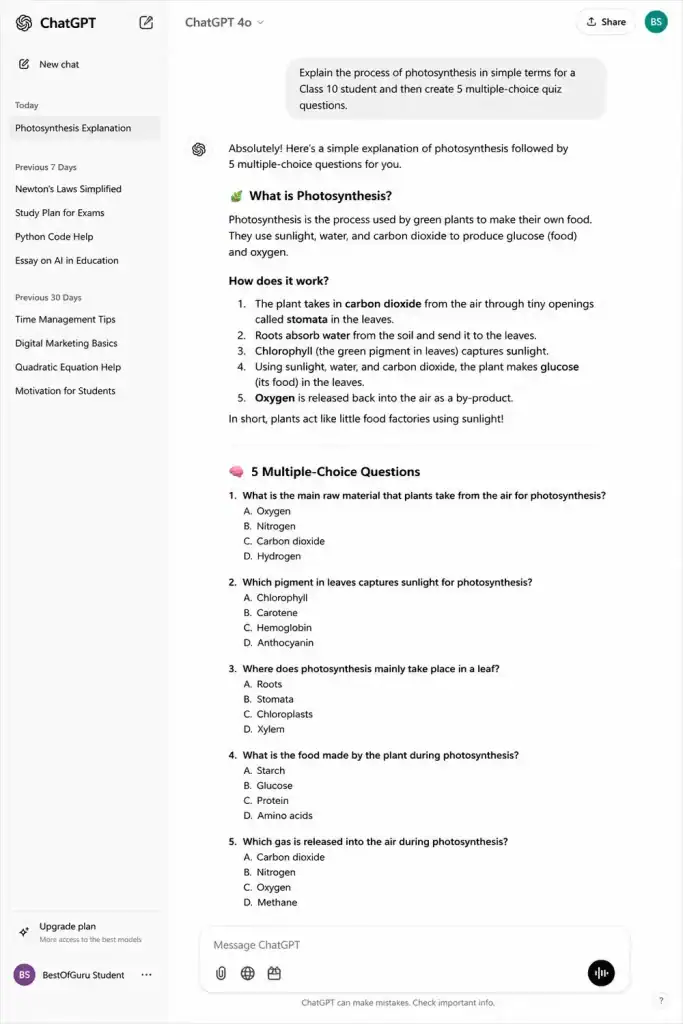
Key features: Natural conversation and follow-up questions, file and image uploads, Deep Research mode for longer reports, voice mode, custom GPTs for repeated tasks.
Pros: Extremely versatile across subjects; huge community of prompt guides and tutorials; the free tier is genuinely usable for daily student questions.
Cons: Free tier has tight message limits; can confidently state wrong facts (always verify); over-reliance can quietly erode your own writing and reasoning skills.
Best for: A general-purpose study assistant for brainstorming, explaining concepts, and drafting (not writing) assignments.
Pricing: Free / ChatGPT Go ₹399/month / ChatGPT Plus ₹1,999/month / ChatGPT Pro ₹19,900/month.
Free plan available: Yes.
2. Google Gemini
Overview: Gemini’s biggest edge for students is that it’s built on Google Search, so it pulls current, cited information instead of relying purely on training data genuinely useful for UPSC-style current affairs or any topic where freshness matters. It’s also deeply woven into Gmail, Docs, and Drive.
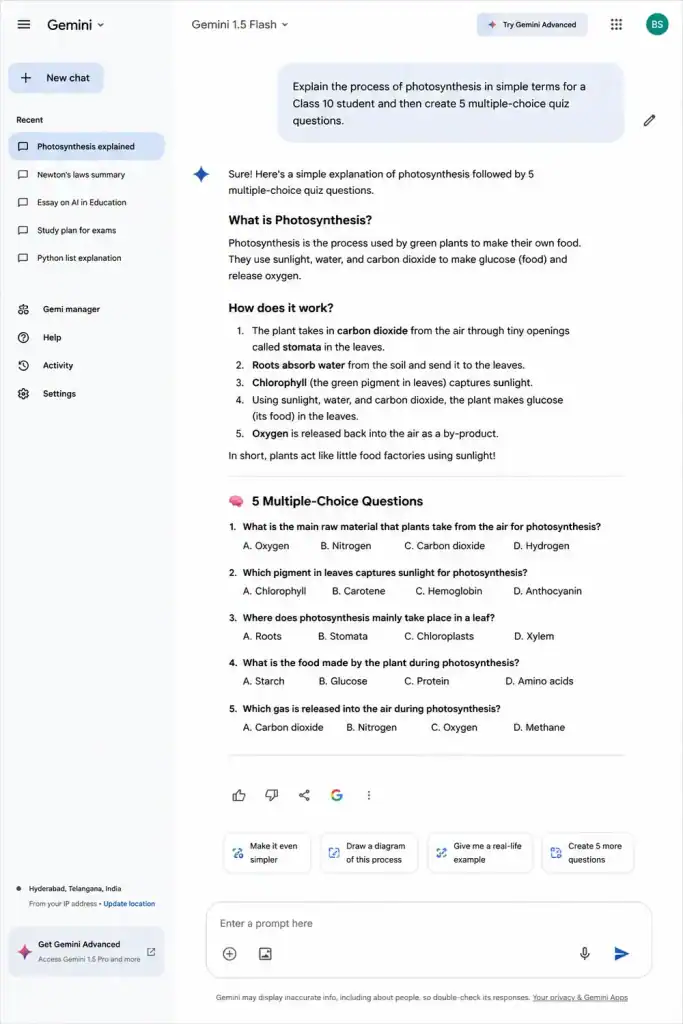
Key features: Live web-grounded answers, Deep Research reports, huge context window for long documents, integration with Google Workspace, bundled NotebookLM access on paid tiers.
Pros: Excellent for anything requiring current information; free tier is one of the most generous around; works natively inside Docs and Gmail.
Cons: Advanced features (Deep Research, longer context) are gated behind the paid Google AI Pro plan; interface can feel scattered across multiple Google apps.
Best for: Research involving recent events, and students already living inside the Google ecosystem.
Pricing: Free / Google AI Pro from around ₹1,950/month (Google has periodically run free or heavily discounted year-long offers for verified Indian students; check gemini.google/students for current eligibility).
Free plan available: Yes.
3. Claude (Anthropic)
Overview: Claude tends to be the pick for students who want AI help with writing without their essay sounding like it went through a corporate polish machine. It’s also strong with very long documents, entire textbook chapters or research papers in one go.
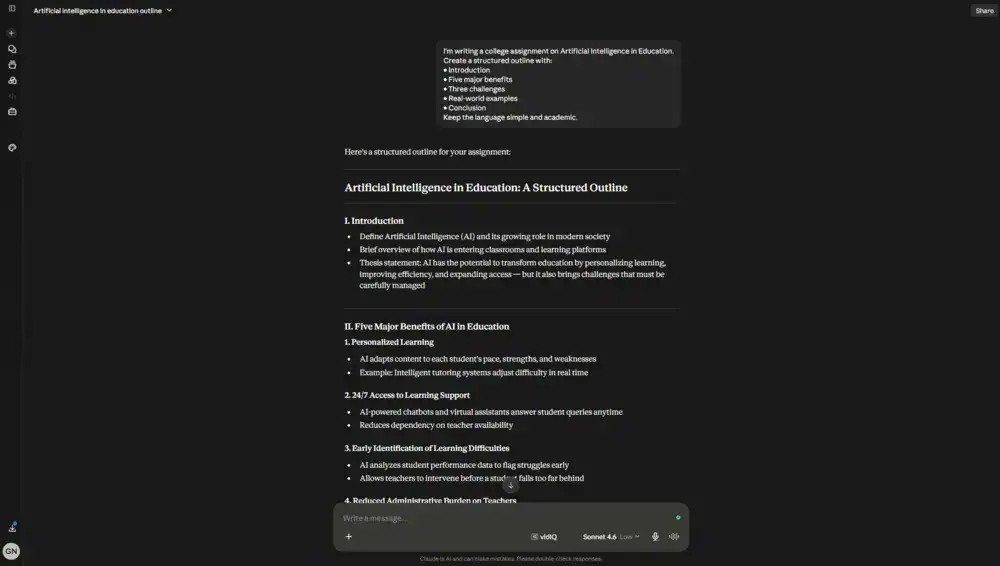
Key features: Large context window for long PDFs and documents, Projects for organizing ongoing coursework, Artifacts for building study documents and interactive content, thoughtful, less “over-edited” writing style.
Pros: Keeps your own voice and tone better than most competitors; handles long academic documents comfortably; free tier is solid for regular use.
Cons: No dedicated individual student discount as of 2026; only available in full through your university if it has a Claude for Education license.
Best for: Editing and improving your own essays and long-document analysis without losing your writing voice.
Pricing: Free / Claude Pro around $20/month ($17/month on annual billing). Some universities offer free institutional access through Claude for Education.
Free plan available: Yes.
4. Microsoft Copilot
Overview: If your college life happens inside Word, Excel, and PowerPoint, Copilot’s advantage is that it works directly inside those apps instead of requiring you to copy-paste everything into a separate chat window.
Key features: In-app assistance for Word, Excel, and PowerPoint; Copilot Chat for general questions; formula generation in Excel; slide creation in PowerPoint.
Pros: Deep Office integration saves real time on formatting-heavy assignments; useful Excel formula help for stats and commerce students.
Cons: No standing student discount on Copilot Pro itself, though Microsoft 365 Personal is often free for the first 12 months for verified students; less capable than ChatGPT or Claude for pure conversational tasks.
Best for: Students who do most of their coursework inside Microsoft Office.
Pricing: Free (basic Copilot) / Copilot Pro around $20/month / Microsoft 365 Personal often free for 12 months for verified students, then roughly $19.99/month.
Free plan available: Yes.
5. Perplexity AI
Overview: Perplexity is built for one job: answering questions with actual citations you can click through and verify, rather than a wall of unsourced text. That makes it one of the better AI research tools for anything you’ll need to reference in an assignment or viva.
Key features: Source-cited answers, Comet browser for in-page research, focus modes (academic, web, video), file upload and analysis.
Pros: Citations you can actually check; free tier includes unlimited basic searches; genuinely faster than manual Google-and-skim research.
Cons: Weaker than ChatGPT or Claude for long-form writing and creative tasks; occasionally cites lower-quality sources if you don’t refine the query.
Best for: Fact-checking, source-backed research, and literature discovery for assignments and papers.
Pricing: Free (unlimited basic search) / Pro around $20/month, with a verified student discount bringing it to roughly $10/month. Indian telecom partnerships have occasionally offered free Pro access; check current offers before paying full price.
Free plan available: Yes.
6. Google NotebookLM
Overview: NotebookLM is quietly one of the best AI note-taking tools for students because it only answers from the sources you upload: your own lecture PDFs, textbook chapters, or class notes instead of pulling from the open internet. That makes it far less prone to hallucinating facts that aren’t in your syllabus.
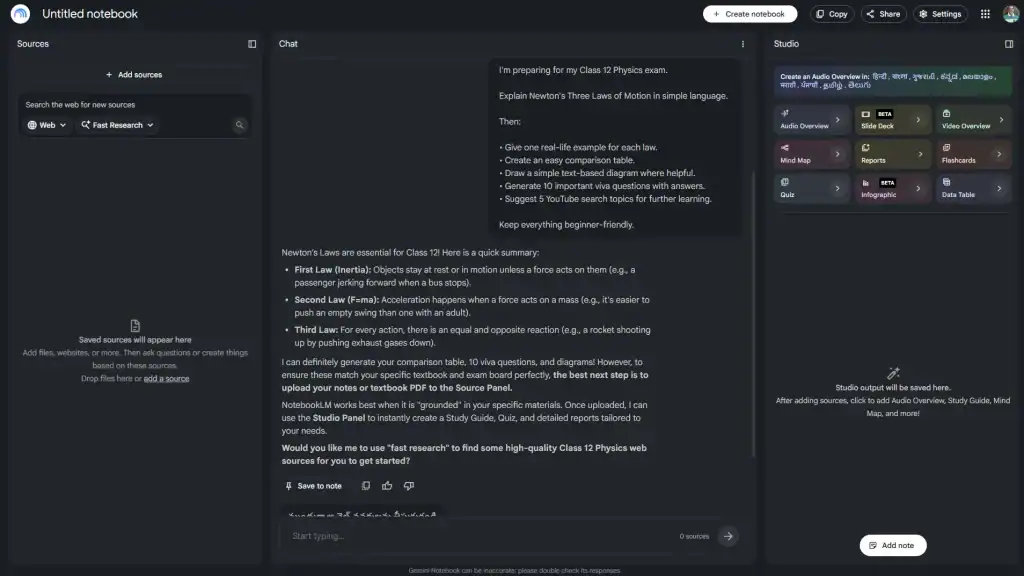
Key features: Source-grounded Q&A, audio “podcast-style” overviews of your notes, mind maps, auto-generated flashcards and quizzes, video overviews.
Pros: Extremely generous free tier; dramatically reduces hallucination risk since it’s grounded in your own documents; audio overviews are genuinely good for revising during a commute.
Cons: Only as good as the sources you feed it; not designed for open-ended research beyond your uploaded material.
Best for: Turning your own lecture notes and readings into summaries, flashcards, and revision audio.
Pricing: Free (100 notebooks, 50 sources each, 50 chats/day) / Plus around $8/month / Pro around $20/month (bundled into Google AI subscription tiers).
Free plan available: Yes.
7. Grammarly
Overview: Grammarly remains the most reliable AI writing tool for students who just need clean, error-free English, catching grammar slips, awkward phrasing, and tone mismatches before a professor does.
Key features: Real-time grammar and spelling checks, tone detection, full-sentence rewrites (paid), plagiarism and AI-text detection (paid), works across browsers, Word, and Google Docs.
Pros: Free tier is more useful than most competitors’ free tiers; works everywhere you write, not just one app; genuinely improves clarity, not just correctness.
Cons: Full-sentence rewrites and plagiarism checking are locked behind the paid Pro plan; can occasionally over-correct a naturally casual writing style.
Best for: Catching grammar mistakes and polishing tone before submission.
Pricing: Free (100 AI prompts/month) / Pro around $12/month on annual billing (around $30/month if billed monthly).
Free plan available: Yes.
8. QuillBot
Overview: QuillBot’s core strength is paraphrasing- rewording a sentence you’ve already written so it reads better without changing the meaning. It’s built with students specifically in mind, right down to the built-in citation generator.
Key features: Multiple paraphrasing modes (Standard, Fluency, Formal), grammar checker, summarizer, citation generator, AI detector and humanizer.
Pros: Citation generator alone saves real time on bibliography formatting; useful across six languages for grammar checking; free tier is enough for occasional use.
Cons: Free plan caps paraphrasing at 125 words per attempt; heavier daily users will hit limits quickly.
Best for: Reworking your own sentences for clarity and generating citations.
Pricing: Free (125-word limit) / Premium from around $8.33/month on annual billing (around $19.95/month billed monthly).
Free plan available: Yes.
9. Wordtune
Overview: Wordtune is a narrower, more focused rewriting tool than QuillBot fewer bells and whistles, but sharper suggestions for tone shifts like “make it formal” or “make it concise.”
Key features: Sentence rewrites in multiple tones, AI-generated summaries, spelling and grammar checks, Microsoft Word integration.
Pros: Suggestions feel more natural than some competitors; good for quickly adjusting formal vs. casual tone in emails and applications.
Cons: Free plan is genuinely limited; 10 rewrites and 3 summaries a day won’t cover a full editing session; can get pricey for what it does.
Best for: Quick tone and phrasing adjustments on your own writing.
Pricing: Free (10 rewrites/day, 3 summaries/month) / Advanced from around $6.99/month / Unlimited around $9.99–$20/month depending on billing.
Free plan available: Yes.
10. Notion AI
Overview: Notion itself is one of the best free workspaces for organizing class notes, assignment trackers, and project timelines in one place. The catch: as of 2026, the full AI feature set (AI agents, workspace-wide Q&A) requires the paid Business plan; the standalone AI add-on was discontinued.
Key features: Databases and templates for class schedules and assignment tracking, AI writing assistance (limited on free/Plus), workspace-wide search on Business, meeting notes.
Pros: The base Notion workspace (without AI) is genuinely excellent and completely free for individuals; great for group project coordination.
Cons: Full AI now requires the Business plan at roughly $20/user/month; expensive if AI is the only reason you’re subscribing.
Best for: Organizing notes, deadlines, and group projects, with AI as a nice-to-have rather than the main draw.
Pricing: Free (workspace, limited AI trial) / Plus around $10/user/month / Business (full AI) around $20/user/month.
Free plan available: Yes (core workspace; AI is limited without Business).
11. Otter.ai
Overview: Otter turns a recorded lecture or group discussion into a searchable, timestamped transcript with an AI summary- a genuine lifesaver if you tend to zone out mid-lecture or juggle group project calls.
Key features: Real-time transcription, speaker identification, AI meeting summaries, searchable transcripts, integration with Zoom/Meet/Teams.
Pros: Free tier’s 300 minutes/month covers a fair number of lectures; search function makes finding “that one thing the professor said” painless.
Cons: Free plan caps each recording at 30 minutes, which is short for a full lecture; Pro plan can feel pricey for occasional use; a verified student discount of around 20% is available but not always obvious to find.
Best for: Transcribing and summarizing lectures, seminars, and group discussions.
Pricing: Free (300 min/month) / Pro around $8.33/month on annual billing ($16.99/month monthly).
Free plan available: Yes.
12. Photomath
Overview: Point your phone camera at a math problem printed or handwritten, and Photomath reads it and shows the steps. It’s the fastest way to check your own work on algebra through calculus.
Key features: Camera-based problem scanning, multiple solution methods, step-by-step explanations, covers arithmetic through calculus.
Pros: Camera recognition is genuinely reliable, even on messy handwriting; free tier covers basic step-by-step solving with no account needed.
Cons: Math-only; no help with physics, chemistry, or other subjects; advanced research-level math is outside its scope (use Wolfram Alpha instead).
Best for: K-12 and early college students checking or learning math homework steps.
Pricing: Free (unlimited basic steps) / Plus around $9.99/month or $69.99/year for animated tutorials and textbook-specific solutions.
Free plan available: Yes.
13. Wolfram Alpha
Overview: Where Photomath is about speed and simplicity, Wolfram Alpha is about raw computational power genuinely advanced math, physics, chemistry, and engineering calculations that go far beyond what a camera-scan app can handle.
Key features: Symbolic and numeric computation, step-by-step solutions for advanced math, unit conversions, data and statistics tools.
Pros: Unmatched depth for engineering, physics, and advanced mathematics; free tier already handles most undergraduate-level work.
Cons: Query syntax needs to be fairly precise; you can’t always phrase a problem the way you’d naturally speak it; less intuitive for beginners than Photomath.
Best for: Engineering and physics students who need dependable, accurate computation.
Pricing: Free / Pro around $7/month for fuller step-by-step views.
Free plan available: Yes.
14. Khanmigo (Khan Academy)
Overview: Khanmigo takes a deliberately different approach — instead of handing you the answer, it asks guiding questions in a Socratic-tutoring style, nudging you toward the answer yourself. It’s slower than a typical chatbot, and that’s the point.
Key features: Guided, Socratic-method tutoring, integration with Khan Academy’s full free course library, subject coverage across math, science, and humanities.
Pros: Genuinely teaches rather than just answers; Khan Academy’s core course content remains completely free regardless of Khanmigo access.
Cons: Availability and pricing depend heavily on whether your school or district has partnered with Khan Academy; individual access outside the US is inconsistent; slower pace won’t suit last-minute homework panic.
Best for: Students who want to build real understanding rather than just get answers, especially in partner-school districts.
Pricing: Free for students in participating school district partnerships; individual family access around $4/month where available. Khan Academy’s core courses remain free for everyone globally.
Free plan available: Yes (varies by region/institution).
15. Gamma
Overview: Gamma turns a rough outline or prompt into a fully designed presentation, document, or simple webpage in under a minute — genuinely useful the night before a seminar presentation is due.
Key features: AI-generated slide decks from a prompt or outline, one-click redesign, AI image generation within slides, export to PDF/PPT.
Pros: Fast — a workable first draft of a 10-slide deck in well under a minute; free tier’s 400 credits are enough to try several real presentations.
Cons: Free-tier decks carry Gamma branding; credits don’t refresh monthly on the free plan, so once they’re gone, you’re upgrading or stopping.
Best for: Fast, presentable slide decks when you’re short on time or design skills.
Pricing: Free (400 one-time credits) / Plus from around $8–12/month / Pro from around $18–25/month.
Free plan available: Yes.
16. Canva Magic Studio
Overview: Canva was already the go-to design tool for non-designers, and Magic Studio bakes AI directly into that familiar drag-and-drop editor background removal, text-to-image, and AI-assisted presentation building all in one place.
Key features: Magic Write (AI copywriting), Dream Lab (text-to-image), Magic Eraser and Magic Expand, one-click Magic Resize across formats, AI presentation building.
Pros: Enormous template library on top of AI tools; one subscription covers posters, presentations, social posts, and more; free tier gives a genuine (if limited) taste of the AI features.
Cons: Monthly AI credits run out quickly for heavy users; some premium templates and assets cost extra even on the paid Pro plan.
Best for: Visual assignments, posters, infographics, and presentations that need to look genuinely polished.
Pricing: Free (limited monthly AI credits) / Pro around $15/month (roughly ₹1,320) or discounted on annual billing.
Free plan available: Yes.
17. Beautiful.ai
Overview: Beautiful.ai auto-adjusts slide design in real time as you add content, which means even a rushed deck ends up looking deliberately designed rather than thrown together at midnight.
Key features: Smart Slides that auto-adapt layout, AI text and image generation, presentation templates built for consistency.
Pros: Genuinely hard to make an ugly slide with this tool; good for students who need to present but have zero design instincts.
Cons: No permanent free plan; only a 14-day trial that requires card details upfront; pricier than Gamma or Canva for comparable output.
Best for: Polished pitch decks and presentations where design quality really matters (business plan competitions, thesis defenses).
Pricing: No free plan (14-day trial only) / Pro around $12/month on annual billing.
Free plan available: No (trial only).
18. ChatPDF
Overview: ChatPDF does one thing and does it fast: upload a PDF, ask it questions, get answers with page references. No sign-up friction, no learning curve.
Key features: Instant PDF Q&A, page-referenced answers, no-signup quick use for single documents.
Pros: Genuinely the fastest way to interrogate a single PDF a research paper, a syllabus, a long circular; free tier needs no account for light use.
Cons: Daily free usage is capped fairly low; not built for cross-document research across multiple PDFs (NotebookLM or Claude handle that better).
Best for: Quick Q&A on a single PDF, a paper, a notice, or a chapter.
Pricing: Free (limited daily use) / Plus around $19.99/month.
Free plan available: Yes.
19. Humata AI
Overview: Humata is built for chatting with longer, more technical documents, and it’s one of the few tools on this list with pricing specifically aimed at students, verified through a .edu-style email.
Key features: Document Q&A with citations, team collaboration for shared research, page-based usage limits.
Pros: The student plan is genuinely one of the cheapest paid AI tools anywhere; solid for research-heavy document review.
Cons: Free tier’s 60-page monthly limit disappears fast; per-page billing above the free tier can feel unpredictable for large uploads.
Best for: Students on a tight budget who need frequent, in-depth document Q&A.
Pricing: Free (60 pages/month) / Student plan around $1.99/month (with verified student email) / Expert around $9.99/month.
Free plan available: Yes.
20. Elicit
Overview: Elicit is built for a very specific, very academic job: pulling structured data out of dozens of research papers at once for a literature review or systematic review- genuinely useful once you’re past undergrad and into thesis territory.
Key features: Multi-paper search and extraction, structured data tables across papers, systematic review workflow support.
Pros: Extraction depth and evidence-grounding are hard to match; genuinely saves days of manual paper-by-paper reading for serious literature reviews.
Cons: Overkill for a typical undergraduate assignment; paid tiers scale up in price fast for the deeper systematic-review features.
Best for: Postgraduate students and researchers doing formal literature reviews.
Pricing: Free (limited use) / Paid tiers scale up based on volume and depth of extraction needed; check elicit.com for current rates.
Free plan available: Yes.
21. Consensus
Overview: Consensus answers a research question directly from peer-reviewed papers and shows you a “consensus meter” whether the literature broadly agrees, disagrees, or is split on a claim. Great for a fast first-pass on a research question.
Key features: Claim-based search across peer-reviewed literature, Consensus Meter visualization, paper summaries with methodology highlights.
Pros: Fast way to gauge the weight of evidence on a specific claim; a student discount (historically around 40% off) makes the paid tier more accessible.
Cons: Best for triage and quick answers, not deep multi-paper extraction (Elicit handles that better); limited outside peer-reviewed academic sources.
Best for: Quickly checking what the research broadly says about a specific claim.
Pricing: Free / Pro around $10–15/month, with a student discount available.
Free plan available: Yes.
22. SciSpace
Overview: SciSpace focuses on helping you actually understand one dense paper at a time, explaining equations, tables, and jargon in plain language as you read, rather than searching across a broad literature.
Key features: AI Copilot for in-paper Q&A, plain-language explanations of equations and methodology, Deep Review for multi-paper synthesis, citation formatting.
Pros: Genuinely strong for making a single hard paper readable; bundles literature search, PDF chat, and citation tools in one subscription.
Cons: Deep multi-paper synthesis is less refined than Elicit’s extraction workflow; some AI accuracy caveats on very technical fields.
Best for: Reading and understanding individual dense research papers.
Pricing: Free / Premium around $12/month on annual billing.
Free plan available: Yes.
23. Quizlet
Overview: Quizlet has quietly evolved from a flashcard app into a genuine AI study tool. Its AI can generate flashcard sets straight from your notes or a PDF, and its Q-Chat tutor asks guiding questions rather than just handing you answers.
Key features: AI-generated flashcards from notes or PDFs, Q-Chat Socratic tutoring, spaced-repetition Learn mode, image-based flashcard generation for diagrams.
Pros: Saves real time building flashcard sets manually; spaced repetition is backed by genuine memory-science principles; massive existing library of community-made sets.
Cons: Several previously free features (like full Learn and Test modes) now sit behind Quizlet Plus; not built for STEM problem-solving or multi-step math.
Best for: Memorization-heavy subjects: vocabulary, definitions, dates, anatomy, case law.
Pricing: Free (basic flashcards) / Plus around $2.99–7.99/month depending on billing cycle.
Free plan available: Yes.
24. Duolingo Max
Overview: Duolingo remains the easiest on-ramp to daily language practice, and its Max tier adds two genuinely useful AI features: a roleplay conversation partner and a “why was I wrong” explainer for each mistake.
Key features: AI Roleplay conversation practice, AI-generated wrong-answer explanations (now free for all users since January 2026), gamified daily lessons, streak tracking.
Pros: The core app is genuinely free and full of usable content; daily habit-building through gamification works well for language learners specifically.
Cons: Not built for academic writing, exam-specific language prep, or true speaking fluency; pair it with a tutor or exam-prep resource for those goals.
Best for: Building a consistent daily language-learning habit with light conversational AI practice.
Pricing: Free / Super Duolingo from around $7–10/month (annual) / Duolingo Max from around $15–30/month.
Free plan available: Yes.
25. Speechify
Overview: Speechify converts text PDFs, articles, Google Docs, even a photo of a textbook page into natural-sounding audio. Genuinely useful for students who retain information better by listening, or who simply want to “read” a dense chapter during a commute.
Key features: Text-to-speech across PDFs, web pages, and documents, OCR for scanning physical text, adjustable playback speed up to several times normal, Chrome extension for reading web pages aloud.
Pros: Turns dead commute or gym time into revision time; genuinely helpful for students with reading difficulties, not just a convenience feature.
Cons: Free tier’s voice quality and speed caps are noticeably more limited than Premium; some reviewers report free trials nudging quickly toward a paid card charge; read the fine print before signing up.
Best for: Auditory learners and anyone who wants to consume readings on the go.
Pricing: Free (limited voices and speed) / Premium around $11.58/month on annual billing (around $29/month monthly).
Free plan available: Yes.
Best AI Tools by Category
If you don’t want to read all 25 reviews, here’s the shortcut — pick based on what you’re actually trying to do right now.
| Category | Top Pick | Runner-Up | Why |
|---|---|---|---|
| General AI assistant | ChatGPT | Claude | Broadest use across subjects; Claude wins if you want your own writing voice preserved |
| AI research tools | Perplexity AI | Consensus | Cited, verifiable answers matter more than raw fluency for research |
| AI writing tools for students | Grammarly | QuillBot | Grammarly for correctness, QuillBot if paraphrasing is your main need |
| AI note-taking tools | Google NotebookLM | Otter.ai | NotebookLM for reading material, Otter for live lectures |
| AI productivity tools | Notion AI | Speechify | Notion for organizing, Speechify for consuming reading material |
| AI presentation tools | Gamma | Canva Magic Studio | Gamma for speed, Canva if you also need posters/social assets |
| AI math tools | Wolfram Alpha | Photomath | Wolfram for depth and accuracy, Photomath for speed and simplicity |
| AI tools for competitive exam prep | Google Gemini | Perplexity AI | Live, cited current-affairs answers matter most here |
| AI tools for academic research/theses | Elicit | SciSpace | Elicit for multi-paper extraction, SciSpace for single-paper depth |
If you’re already deep into using ChatGPT specifically, it’s worth also checking our dedicated guides on using ChatGPT for writing and, if you eventually start blogging about your own study notes or niche interests, how to use ChatGPT for blogging covers that transition well.
Free vs Paid: Which AI Tools Are Actually Worth Paying For?
Here’s the honest answer: most students don’t need to pay for anything until their free-tier limits start actively slowing them down.
Stick with free if:
- You’re a school student or early-year undergrad with light, occasional AI use
- Your main need is quick explanations, grammar checks, or basic research
- You’re still figuring out which tool actually fits your workflow
Consider upgrading if:
- You’re hitting daily message or word limits consistently (a real signal, not FOMO)
- You need long-document handling (Claude Pro, NotebookLM Plus) for a thesis or dissertation
- You’re doing formal academic research requiring deep literature extraction (Elicit, SciSpace)
- Lecture transcription is core to how you study (Otter.ai Pro)
| Consideration | Free Tools | Paid Tools |
|---|---|---|
| Cost | ₹0 | Roughly ₹400–2,000/month per tool |
| Message/usage limits | Tight, resets daily/monthly | Higher or unlimited |
| Advanced features | Usually locked | Full access |
| Best for | Occasional to moderate use | Daily, heavy, or research-grade use |
| Risk | Hitting limits mid-task | Subscription creep across multiple tools |
The biggest mistake I see students make isn’t picking the wrong tool — it’s subscribing to four or five overlapping tools at once. ChatGPT Plus and Claude Pro and Perplexity Pro and Grammarly Pro add up fast. Pick one general assistant, one research tool, and one writing tool, and only add a fourth subscription once you’ve genuinely outgrown what you have.
Also actively look for student discounts before paying full price. Perplexity, Otter.ai, Consensus, and Humata all offer verified student pricing, and Google has periodically run free year-long offers for verified Indian university students on Gemini Advanced. A five-minute SheerID verification can save real money.
Tips for Students: How to Use AI Tools the Smart Way
1. Use AI to think alongside you, not instead of you. Ask it to explain a concept three ways, quiz you, or poke holes in your argument that builds understanding. Asking it to write the paragraph for you doesn’t.
2. Always verify facts, especially numbers and citations. AI tools occasionally state wrong things with total confidence. Cross-check anything you’re submitting, particularly dates, statistics, and references.
3. Learn your institution’s AI policy before relying on any tool. Rules vary widely; some allow AI for brainstorming but not drafting. Check before building a habit around a tool you might not be allowed to use.
4. Match the tool to the task, not the hype. Don’t use ChatGPT for a math derivation when Wolfram Alpha gets it right the first time. Don’t use a general chatbot for citation-backed research when Perplexity or Consensus exist specifically for that.
5. Keep a “verify later” habit for research tools. Perplexity, Consensus, and Elicit are good, but click through to the actual source before quoting it. A citation you haven’t personally checked isn’t really a citation yet.
6. Batch your AI usage instead of chatting all day. Focused sessions “help me outline this essay,” “quiz me on these 20 flashcards” beat an open-ended chat running in the background all day.
Common Mistakes Students Make With AI Tools
❌ Submitting AI-generated text as your own final work. Beyond the integrity risk, it means you didn’t actually learn the material, which shows up badly in exams and vivas where there’s no AI to lean on.
❌ Trusting AI-generated citations without checking them. Chatbots occasionally invent plausible-sounding references that don’t exist. Always verify a citation is real before it goes in your bibliography.
❌ Paying for five overlapping subscriptions. Most students need one general assistant, one research tool, and maybe one writing tool. Anything beyond that is usually redundant.
❌ Using a general chatbot for tasks a specialized tool does better. ChatGPT can attempt a calculus derivation, but Wolfram Alpha is built for it and gets it right more reliably.
❌ Skipping your institution’s AI policy entirely. Getting flagged for undisclosed AI use on work you assumed was fine is genuinely avoidable with a two-minute policy check.
❌ Letting AI replace active recall instead of supporting it. Reading an AI summary feels like learning, but it’s passive. Flashcard tools like Quizlet or NotebookLM’s quiz generation force actual retrieval what builds long-term memory.
FAQs
1. What are the best free AI tools for students in 2026?
ChatGPT, Google Gemini, Google NotebookLM, Perplexity AI, Grammarly, and QuillBot all offer genuinely usable free tiers. Together they cover writing, research, and note-taking without spending anything.
2. Which AI tool is best for writing assignments?
Grammarly is best for catching grammar and tone issues. Claude tends to preserve your natural voice better than ChatGPT when editing a draft. QuillBot is strongest specifically for paraphrasing.
3. Are AI tools allowed in college assignments?
It varies by institution and course. Some allow AI for brainstorming but not drafting; others restrict it entirely. Always check your specific university’s or exam board’s current AI policy rather than assuming.
4. Can I use ChatGPT for research papers?
You can use it to brainstorm angles or explain a concept, but you shouldn’t rely on it for citations without verification it can generate confident-sounding but inaccurate references. Perplexity, Consensus, or Elicit are built specifically to cite real, checkable papers.
5. What is the best AI tool for competitive exam preparation (UPSC, banking, SSC)?
Google Gemini’s web-grounded, cited answers make it strong for current affairs. Perplexity is a close second. Neither replaces standard exam-prep material; use them to clarify concepts, not as a primary study source.
6. Is there a single AI tool that does everything a student needs?
No. ChatGPT and Gemini come closest to being all-rounders, but even they benefit from pairing with a specialized tool: Wolfram Alpha for advanced math, Grammarly for polish, NotebookLM for source-grounded notes.
7. Do AI tools have plagiarism or AI-detection risks?
Yes. Many universities run submitted work through AI-content detectors, and tools like Grammarly and QuillBot include their own detection features. The safest approach is writing your own work with AI as a brainstorming aid, not a ghostwriter.
8. Which AI tools give student discounts in India?
Perplexity Pro, Otter.ai, Consensus, and Humata AI all offer verified student pricing. ChatGPT’s Go plan (₹399/month) targets markets like India specifically. Google has periodically offered free year-long Gemini Advanced access for verified Indian university students; check official offer pages before assuming a deal is still live.
9. What’s the difference between free and paid AI tools for students?
Free tiers cap daily or monthly usage and lock advanced features behind a paywall. Most students only need to upgrade once they’re consistently hitting those limits, not before.
10. Are AI presentation tools like Gamma good enough for college presentations?
Yes, for most academic and seminar presentations. Gamma and Canva Magic Studio both produce professional-looking decks fast. For high-stakes presentations, Beautiful.ai’s auto-adjusting design looks the most polished, though it has no free tier.
Conclusion
Twenty-five tools is a lot to take in, so here’s the one piece of advice that actually matters more than any individual pick on this list: choose tools based on what you’re genuinely trying to learn, not based on which app is trending this month.
A student who picks one solid AI assistant, one research tool, and one writing aid and actually learns to use them well will get more out of AI than someone juggling ten subscriptions and using none of them properly. Start with the free tiers. Upgrade only when a limit is genuinely getting in your way. And treat every AI-generated answer as a starting point for your own thinking, not a finished product to hand in.
The Best AI Tools for Students aren’t the ones with the flashiest features; they’re the ones that quietly make you a faster, sharper learner without doing the learning for you. Pick accordingly.