How to Create an AI Content Style Guide for Your Brand (Step-by-Step)
AI can produce a perfectly readable article today and then create something that feels completely different tomorrow.
The grammar may be fine. The information may be useful. The SEO may even be solid.
But your brand voice becomes inconsistent.
One article sounds conversational. Another sounds corporate. One uses practical examples. Another feels like a textbook. Even your preferred terminology can change from page to page.
If you’re publishing regularly with ChatGPT, Claude, or another AI writing tool, fixing those differences manually isn’t a scalable workflow.
The solution is to create a reusable AI content style guide.
Instead of repeatedly explaining how your brand should sound, you document those rules once and use them as the editorial foundation for future content.
In this guide, you’ll learn what an AI content style guide should contain, how to create one, how to turn your existing writing preferences into reusable rules, and how to use the finished guide with AI writing workflows.
What Is an AI Content Style Guide?
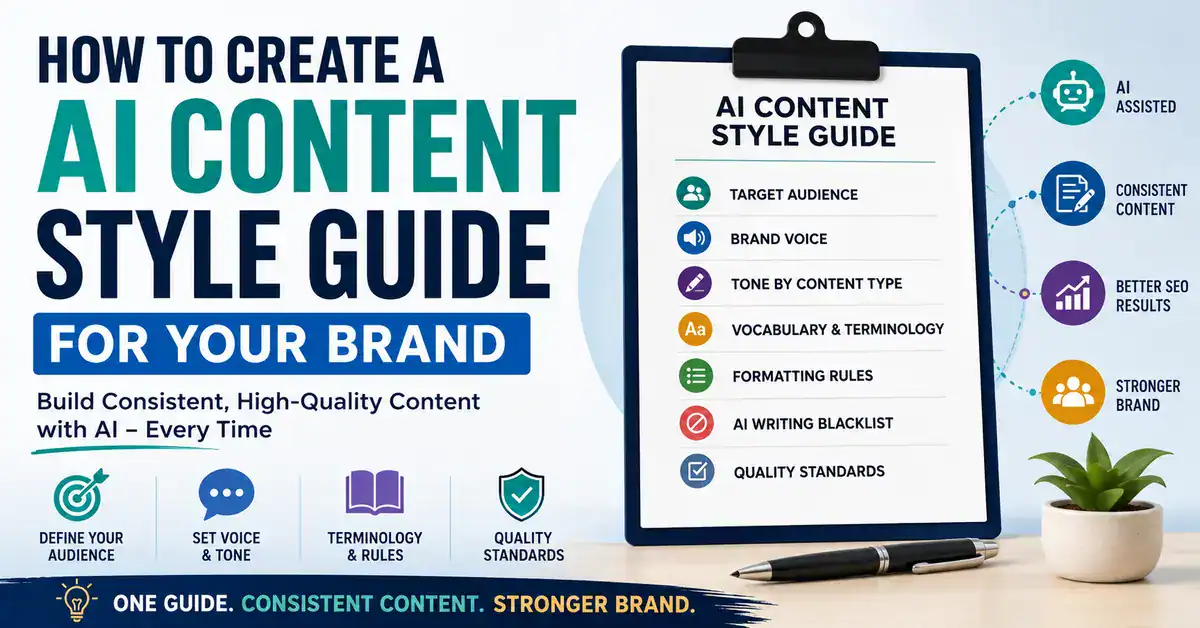
An AI content style guide is a documented set of rules that explains how content should be created for your brand when you’re using AI.
Think of it as an editorial rulebook that both you and your AI writing tools can follow.
It can define things such as:
- Who your content is written for
- How your brand should sound
- How formal or conversational the writing should be
- Which words and terminology you prefer
- Which expressions you avoid
- How headings should be structured
- How paragraphs, lists, and tables should be used
- How examples should be presented
- What makes an article good enough to publish
- What AI should never do
The goal isn’t to make every article identical.
Consistency doesn’t mean repetition.
Your subjects can change. Your examples can change. Your opinions can change.
What stays consistent is the underlying editorial standard.
Why Do You Need a Style Guide for AI-Assisted Content?
Without documented guidelines, you’re relying on the AI tool to infer your preferences from whatever information happens to be available in the current workflow.
That can produce inconsistent results.
For example, you might tell ChatGPT:
Write this for beginner bloggers. Keep it practical and conversational.
That’s useful, but it’s still a very small description of your brand.
What does “conversational” actually mean?
Should sentences be short?
Should contractions be used?
Should the writer use first person?
How much technical terminology is acceptable?
Should the article use bullet lists frequently?
Should recommendations be direct or cautious?
What words does your brand normally use?
What should AI avoid?
A style guide answers those questions once.
Then your individual article prompt can focus primarily on what you’re writing about, rather than repeatedly explaining how your entire brand communicates.
Writing Voice vs. Content Style Guide
These two concepts are related, but they aren’t the same.
A Writing Voice Document describes how you naturally write.
A Content Style Guide takes that information and expands it into a broader system for publishing consistent brand content.
| Writing Voice Document | AI Content Style Guide |
|---|---|
| How you naturally write | How the brand should publish |
| Sentence rhythm | Voice and tone |
| Personal vocabulary | Brand terminology |
| Personal writing habits | Formatting rules |
| How you express opinions | Content quality standards |
| What your writing avoids | AI-specific rules and blacklist |
| Individual writing style | Broader editorial system |
If you’ve already created a custom ChatGPT writing voice, don’t throw it away. Use it as one of the inputs for your content style guide.
For example, your voice document might say:
“I prefer direct openings and short-to-medium paragraphs.”
Your broader style guide can turn that into an editorial rule:
“Articles should normally begin by addressing the reader’s problem directly rather than using a generic introduction. Prefer short-to-medium paragraphs for readability.”
That’s the difference between describing a preference and creating a reusable publishing rule.
Write down three things you already know about your preferred writing style.
For example:
- How you normally begin an article
- How long you prefer your paragraphs to be
- How you explain technical concepts
These observations will become the starting material for your style guide.
What Should an AI Content Style Guide Include?
A useful style guide doesn’t need to become a corporate manual.
For most bloggers, creators, and small brands, these are the most important components.
1. Define Your Target Audience
Start with the reader.
AI can’t consistently match your communication style if it doesn’t understand who the content is intended for.
Document:
- Who your audience is
- Their experience level
- What they’re trying to accomplish
- What they already understand
- Where they commonly struggle
- What type of information they value
For example:
Audience: Beginner-to-intermediate bloggers and creators building websites and using AI, SEO and digital tools to grow their online presence.
Knowledge level: Readers understand basic blogging concepts but may need technical terminology explained.
Content preference: Practical explanations, examples, comparisons and clear next steps are more useful than theory alone.
That’s much more useful to an AI than simply saying:
“Write for beginners.”
BESTOFGURU ACTION STEP
Write a one-paragraph description of your ideal reader.
Ask:
Who are they? What are they trying to accomplish? What do they already know? Where do they usually get stuck?
Don’t write what sounds impressive.
Write what helps someone create better content for that reader.
2. Define Your Brand Voice
Your voice is the consistent personality behind your content.
Avoid vague instructions such as:
“Make it engaging.”
That’s difficult for AI to interpret.
Instead, describe what your preferred voice actually means.
For example:
Voice: Practical, direct, knowledgeable, conversational and analytical.
Personality: Helpful without being overly enthusiastic.
Approach: Explain what works, what doesn’t, why it matters and what the reader should do next.
Confidence: Make clear recommendations when the evidence supports them, while acknowledging meaningful limitations.
Language: Prefer straightforward language over corporate or unnecessarily academic wording.
These instructions give AI something concrete to follow.
You can make them even more useful by adding examples.
3. Define Your Tone for Different Situations
Your voice should remain relatively consistent.
Your tone can change depending on what you’re writing.
A troubleshooting article doesn’t need the same tone as a product comparison.
For example:
| Content situation | Preferred tone |
|---|---|
| Beginner tutorial | Clear, patient, and practical |
| Troubleshooting guide | Direct and diagnostic |
| Product comparison | Neutral and analytical |
| Opinion section | Confident but evidence-based |
| Warning | Direct and specific |
| Monetization section | Transparent and non-pushy |
This prevents a common mistake:
Trying to make every piece of content sound the same.
A consistent brand can still adapt its tone to the situation.
4. Create a Terminology and Word-Choice Guide
AI can easily switch terminology between articles.
For example, one article might call someone a reader, another might call the same person a user, and another might call them an audience member.
None of those is necessarily wrong.
But if your brand has a preference, document it.
Create a simple table:
| Prefer | Avoid or use cautiously |
|---|---|
| readers | users, when referring to blog readers |
| use | utilize, when unnecessary |
| website | web property, unless technically relevant |
| explain | overly academic alternatives |
| practical | inflated marketing language |
These are examples, not universal writing rules.
The correct terminology depends on your brand and audience.
The important thing is to tell AI what your preference is.
5. Define Your Formatting Rules
Your brand’s consistency isn’t only about words.
It’s also about how information is presented.
Your style guide can establish rules for:
Headings
- Use H2 for major sections.
- Use H3 for subsections.
- Make headings descriptive.
- Don’t create a heading simply to break up a very short paragraph.
Paragraphs
- Prefer short-to-medium paragraphs.
- Use very short paragraphs for emphasis when appropriate.
- Avoid large walls of text.
- Don’t turn every sentence into a separate paragraph.
Lists
Use lists when they make information easier to scan.
Don’t convert ordinary prose into a list simply because AI tends to prefer lists.
Tables
Use tables when readers genuinely need to compare several attributes.
Don’t create a table for information that would be clearer as normal prose.
Examples
Use specific examples rather than generic filler.
This is particularly important when you’re using AI.
6. Create an AI Writing Blacklist
AI writing often has recognizable habits.
You may repeatedly see openings such as:
“In today’s digital landscape…”
or:
“In the ever-evolving world of…”
You may also notice unnecessary phrases such as:
“It’s worth noting that…”
“With that in mind…”
“Let’s dive in…”
And exaggerated marketing language such as:
“game-changing”
“revolutionary”
“unlock the power of”
“take your strategy to the next level”
If these patterns don’t fit your brand, document them.
Don’t create an AI blacklist simply by copying a random list of “words AI uses.”
Context matters.
A word isn’t automatically bad because AI sometimes uses it.
Your blacklist should contain patterns that genuinely make your content sound unlike your brand.
For example, you might prohibit:
Generic introductory statements that don’t address the reader’s actual problem.
That’s often more useful than banning one particular word.
7. Show AI What Good Content Looks Like
Rules are useful.
Examples are often even better.
Suppose your style guide says:
“Be direct and avoid generic introductions.”
That’s helpful.
Now show AI what you mean.
Generic AI style:
Creating a content strategy is an important step for businesses looking to improve their online presence and connect with their target audience.
More direct style:
Don’t start publishing just because you have 20 topics in a spreadsheet. First decide what those topics are supposed to accomplish.
The second version demonstrates several preferences at once:
- Direct opening
- Specific statement
- Clear point of view
- Less filler
- Practical advice
You don’t need dozens of examples.
A few strong examples can communicate your preferences much more effectively than pages of abstract instructions.
8. Define Your Content Quality Standards
Your style guide should answer a bigger question:
What makes an article good enough to publish?
For example, your brand might require every article to:
- satisfy the primary search intent
- answer the reader’s actual problem
- provide practical information
- distinguish facts from opinions
- use relevant examples
- avoid unnecessary repetition
- use internal links naturally
- avoid unsupported claims
- be reviewed before publishing
- provide accurate information
- acknowledge meaningful limitations
This section transforms your style guide from a writing document into an editorial system.
This becomes particularly useful when you’re building a repeatable ChatGPT-assisted blogging workflow, because the style guide can define the editorial standards that every article should follow.
9. Add Rules for AI’s Behavior
Once your editorial rules are documented, you can use them alongside a broader ChatGPT writing workflow rather than repeating the same instructions every time you start an article.
For example:
Don’t invent facts, statistics, product capabilities or quotations.
If information is uncertain or potentially outdated, flag it for verification.
Don’t present assumptions as facts.
Don’t create fake examples that look like real statistics or research.
These rules are particularly valuable when AI is helping produce articles about technology, products, or changing platforms.
10. Turn Everything Into One Reusable Document
Once you’ve defined the individual rules, combine them into a single document.
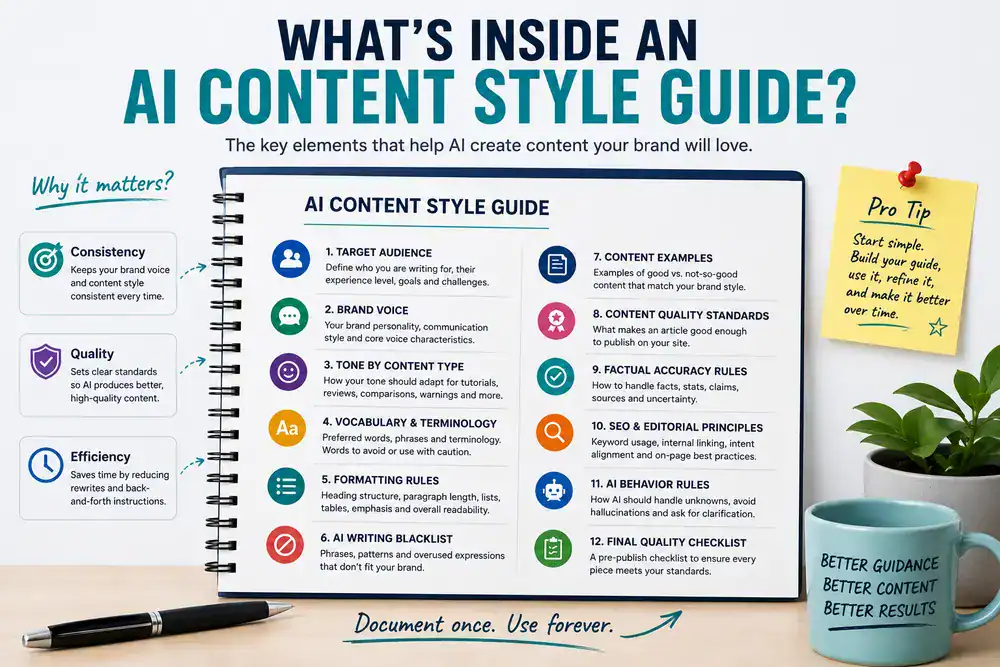
A practical structure could look like this:
AI Content Style Guide

1. Brand Overview
2. Target Audience
3. Brand Voice
4. Tone by Content Type
5. Vocabulary & Terminology
6. Formatting Rules
7. AI Writing Blacklist
8. Content Examples
9. Content Quality Standards
10. Factual Accuracy Rules
11. SEO & Editorial Principles
12. Final Quality Checklist
The exact structure doesn’t matter as much as the clarity of the rules.
The guide should be easy for both humans and AI tools to understand.
11. Create the Style Guide With AI
You don’t have to write the entire document manually.
You can give an AI tool your existing materials and ask it to organize them.
For example, you might already have:
- a writing voice document
- an AI blacklist
- several good articles
- brand information
- audience information
- terminology preferences
- formatting preferences
Put those together and use a prompt like this.
Create a reusable AI Content Style Guide from the information below.
Organize it into these sections:
- Brand and audience
- Brand voice
- Tone by content type
- Sentence and paragraph style
- Vocabulary and terminology
- Words, phrases, and patterns to avoid
- Formatting rules
- How examples should be used
- Content quality standards
- Factual accuracy and uncertainty
- SEO and editorial principles
- Final pre-publishing checklist
Do not invent brand preferences that aren’t supported by the supplied information.
If the supplied information is incomplete, mark the item as [TO BE DEFINED] rather than guessing.
Where two instructions conflict, identify the conflict instead of silently choosing one.
Keep the final guide practical enough to serve as a reference for creating AI-generated content.
Source material:
[PASTE YOUR WRITING VOICE DOCUMENT]
[PASTE YOUR AI WRITING BLACKLIST]
[PASTE YOUR BRAND INFORMATION]
[PASTE YOUR BEST WRITING EXAMPLES]
Don’t Try to Perfect It in One Day
Your first version won’t be perfect.
That’s fine.
You’ll discover problems once you start using it.
Perhaps AI:
- makes introductions too long
- uses too many bullet points
- explains concepts your audience already understands
- doesn’t make strong enough recommendations
- uses terminology inconsistently
- keeps repeating a particular phrase
Don’t keep manually correcting the same problem.
Update the style guide.
The workflow should become:
AI makes a recurring mistake
↓
You identify the pattern
↓
You add or modify a rule
↓
Future content improves
That’s how the document becomes more valuable over time.
How to Use Your Style Guide With ChatGPT or Claude
Once you’ve created the guide, there are several ways to use it.
Option 1: Attach the guide to a project
If your AI platform supports persistent project-level files or instructions, you can provide the style guide there.
Then individual article prompts can focus on the specific assignment.
Option 2: Include the relevant sections
For smaller tasks, you don’t always need to provide the entire document.
For example, a social-media task might primarily need:
- voice
- tone
- terminology
- blacklist
An SEO article might also need:
- formatting
- content quality
- SEO/editorial rules
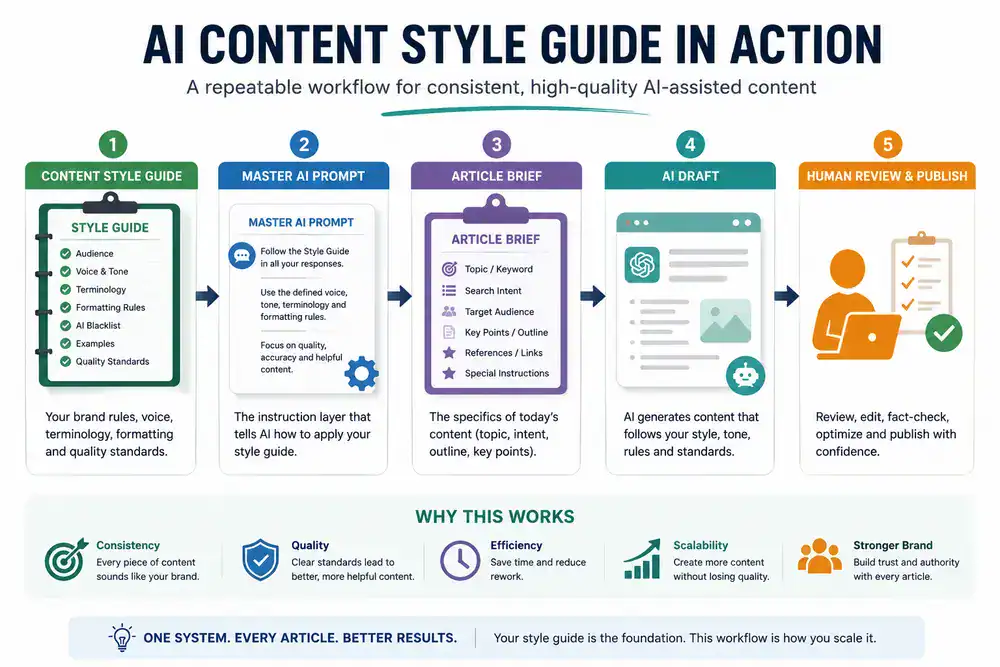
Option 3: Combine it with a Master Prompt
For a serious content workflow, this is usually the most useful structure.
Think of it as:
Content Style Guide
↓
Master AI Writing Prompt
↓
Article Brief
↓
AI Draft
↓
Human Editorial Review
The style guide defines your brand rules.
The master prompt tells the AI how to apply those rules.
The article brief tells it what today’s content needs to accomplish.
That separation makes the system easier to maintain.
A Simple Folder Structure for Your AI Content System
You don’t have to keep everything inside one giant document.
A simple folder structure can make the system much easier to maintain.
My AI Content System/
├── 01 – Brand & Audience
├── 02 – Writing Voice Document
├── 03 – AI Writing Blacklist
├── 04 – AI Content Style Guide
├── 05 – Master Voice Prompt
└── 06 – Content Quality Checklist
You don’t need to create every file immediately.
If you already have a Writing Voice Document, AI Blacklist, and Master Voice Prompt from the previous process, you’re already partway there.
Start With a Minimum Viable Style Guide
Here’s an important point: don’t let documentation become procrastination.
You don’t need a giant editorial manual before publishing your next article.
If you’re starting from scratch, create these five sections first:
1. Audience
Who are you writing for?
2. Voice and tone
How should the brand sound?
3. Terminology
What words or terms should the brand consistently use?
4. AI blacklist
What recurring AI patterns should be avoided?
5. Examples
What does good brand writing actually look like?
That’s enough to create your first usable version.
Add formatting, SEO, quality-control, and other rules as you learn what your content workflow needs.
Test Your Style Guide Before Trusting It
Don’t assume your guide works simply because it looks comprehensive.
Test it.
Give the AI the same topic or two closely related topics and compare the results.
Ask:
- Do they sound like the same brand?
- Is the terminology consistent?
- Is the tone appropriate?
- Are the paragraphs and headings consistent?
- Did the blacklist work?
- Does the writing still feel natural?
- Did the rules make the content unnecessarily stiff?
That last question matters.
Too little guidance creates inconsistency. Too much guidance can create robotic writing.
Your goal is not to make AI follow hundreds of rigid rules.
Your goal is to give it enough context to consistently understand what your brand considers good content.
Keep Improving the Guide as Your Brand Grows
Your style guide shouldn’t be treated as a document you create once and forget.
Think of it as a living editorial system.
Every few weeks or months, review your published content and ask:
- What consistently works?
- What sounds unlike the brand?
- Which AI mistakes keep returning?
- Are our terminology choices still appropriate?
- Has our audience changed?
- Are our content standards becoming more sophisticated?
Then update the guide.
This creates a useful feedback loop:
Publish → Review → Identify patterns → Update the guide → Publish better content
Over time, the style guide becomes a record of what your brand has learned about communicating effectively.
AI Content Style Guide vs. AI Writing Prompt
These are also easy to confuse.
They’re related, but they perform different jobs.
| AI Content Style Guide | AI Writing Prompt |
|---|---|
| Defines the brand’s editorial rules | Gives AI a specific assignment |
| Designed for reuse | Usually task-specific |
| Defines voice and tone | Tells AI what to create |
| Defines terminology | Defines today’s topic |
| Defines formatting standards | Defines today’s output |
| Defines quality standards | Provides today’s objectives |
For example:
Style guide:
Use direct openings, short-to-medium paragraphs and plain language.
Article prompt:
Write a 2,500-word guide explaining how to choose web hosting for a new WordPress website.
The first tells AI how the brand communicates.
The second tells it what today’s content needs to accomplish.
Keeping those responsibilities separate makes your workflow much easier to manage
Build Version 1 Today
Don’t wait until you have a perfect system.
Open a document and create these headings:
- Audience
- Voice
- Tone
- Terminology
- Formatting
- AI Blacklist
- Examples
- Quality Standards
Spend 15–30 minutes filling in what you already know.
Then use the prompt in this article to turn your notes into a cleaner working document.
After you’ve used it for several articles, update it based on what actually happens.
Your first version is a starting point, not the finished system.
Frequently Asked Questions
What is an AI content style guide?
An AI content style guide is a reusable set of rules that explains how AI should create content for a particular brand. It can define the audience, voice, tone, terminology, formatting, examples, quality standards, and AI-specific rules.
Is an AI content style guide the same as a brand voice guide?
No. A brand voice guide primarily explains how a brand communicates. An AI content style guide can include those voice rules but also cover formatting, terminology, examples, content standards, and instructions specifically designed for AI-assisted workflows.
How long should an AI content style guide be?
There is no ideal word count. It should contain enough information to remove important ambiguity without becoming so complicated that nobody maintains it. A concise, practical guide is better than a huge document full of vague rules.
Can I use the same style guide with ChatGPT and Claude?
Generally, yes. The editorial rules belong to your brand rather than to a specific AI tool. You may need to adjust how you provide the guide depending on the features and workflow of the AI platform you’re using.
Should I include examples in my AI content style guide?
Yes. Examples can show AI what your rules actually look like in practice. A few strong examples can communicate sentence structure, tone, vocabulary, and formatting preferences more clearly than abstract instructions alone.
How often should I update an AI content style guide?
Update it whenever your brand, audience, or editorial process changes. It’s also useful to review it after you’ve published enough AI-assisted content to identify recurring problems that your existing rules don’t address.
Will a style guide make AI-generated content sound completely human?
No. A style guide can make AI output more consistent with your brand, but it doesn’t replace human judgment. Original experience, useful examples, specific opinions, fact-checking, and editorial review still matter.
Should I create a separate style guide for every AI tool?
Usually not. Your core editorial rules should belong to your brand and remain portable. You can maintain one primary style guide and adapt the implementation instructions for ChatGPT, Claude, or another AI tool when necessary.
The Bottom Line
AI doesn’t need another generic instruction to “write naturally.”
It needs to understand what naturally means for your brand.
That’s what a content style guide provides.
It documents the things that normally live inside your head:
- who you’re writing for
- how your brand sounds
- how your tone changes
- which words you use
- which patterns you avoid
- how you structure information
- what good content looks like
- what standards content must meet
Once those rules are documented, you don’t have to rebuild the same instructions every time you start another article.
Your workflow becomes much simpler:
Brand rules → AI style guide → Master prompt → Article brief → Draft → Human review
And that’s the real advantage.
You’re not just asking AI to write more consistently.
You’re building a repeatable content system that can grow with your brand.