How to Use ChatGPT for Keyword Research
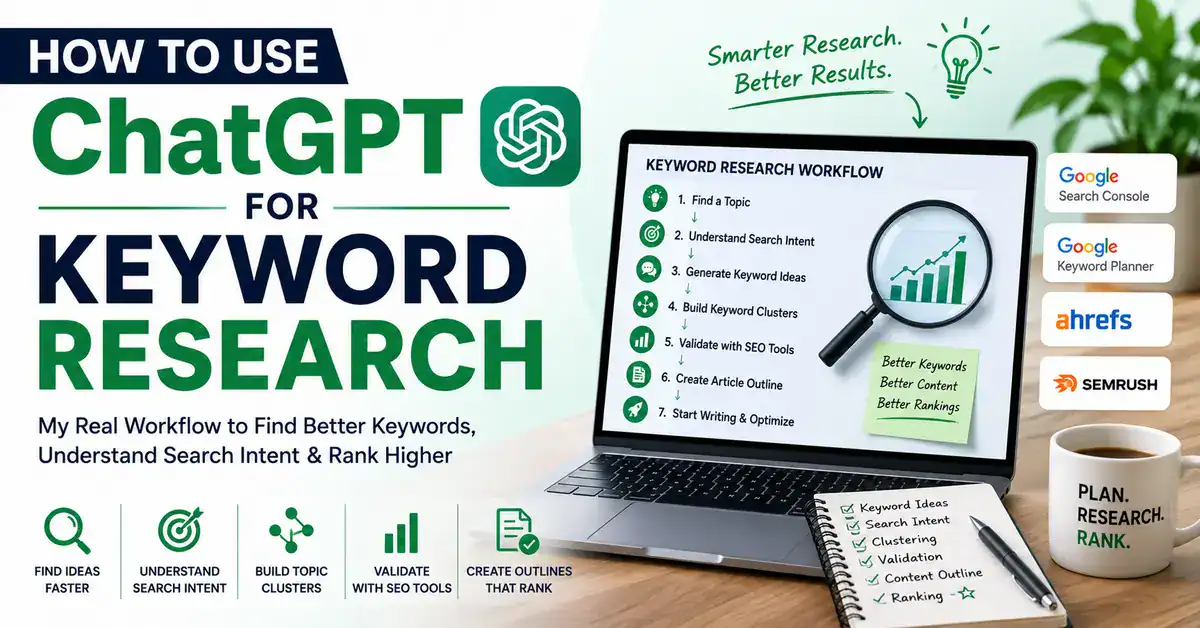
When I first started doing keyword research, I assumed finding good keywords meant chasing search volume. After working on BestOfGuru.in, I realized there’s much more to it. Understanding what people are actually searching for and why they’re searching for it is what leads to better content.
That’s where ChatGPT has become part of my workflow. Learning how to use ChatGPT for keyword research has helped me brainstorm ideas, organize keyword clusters, and understand search intent much faster. But I’ve also learned where ChatGPT’s limitations begin, which is why I always validate its suggestions with proper SEO tools before writing a single article.
Keyword research used to be the part of my workflow I dreaded the most. I’d open Google Keyword Planner, stare at a spreadsheet, and lose momentum before I even wrote a single word. Adding ChatGPT into that process didn’t replace the spreadsheet, but it changed how fast I got to it, and how much smarter my seed keywords were before I ever touched Ahrefs or Search Console.
In this article, I’m walking you through exactly how I use ChatGPT for keyword research today: the good parts, the parts where it genuinely gets things wrong, and the manual checks I never skip. By the end, you’ll have a repeatable workflow you can use for your own blog, whatever niche you’re in.

Quick Takeaway — How I Use ChatGPT for Keyword Research
- I use ChatGPT to brainstorm seed keywords and long-tail variations fast, not to find search volume
- I ask ChatGPT to group ideas into topic clusters before I open any SEO tool
- I get ChatGPT to map out likely search intent for each keyword, then double-check it manually in Google
- I always validate every single keyword in Google Search Console, Keyword Planner, or Ahrefs before writing. This extra validation step has saved me from writing articles around keywords that looked promising in ChatGPT but had little real search demand.
- I use ChatGPT to turn validated keywords into a first-draft article outline
- I never publish a keyword list straight from ChatGPT without checking real search data first
What Is ChatGPT and Can It Help With Keyword Research?
ChatGPT is a language model. It’s trained to predict and generate natural language based on patterns in text. It doesn’t have a live connection to Google’s search index, and it can’t tell you how many people searched “best web hosting India” last month. That’s the part a lot of beginner bloggers get wrong when they first try this.
Where ChatGPT genuinely helps is earlier in the process, the thinking part. It’s good at:
- Generating a wide spread of keyword ideas from one seed term
- Suggesting long-tail variations you might not have thought of
- Grouping related keywords into logical clusters
- Drafting likely search intent based on how a phrase is worded
- Turning a keyword list into a starting outline
Where it falls short and where I’ve seen beginners get burned is anything that requires real, current data:
- Search volume
- Keyword difficulty or competition score
- Current SERP rankings
- Seasonal search trends
- What’s actually ranking on page one right now
I think of ChatGPT as a brainstorming partner, not a research tool. It gets me from a blank page to a rough list in five minutes. Everything after that still runs through Google Search Console, Keyword Planner, and Ahrefs before I trust it.
My Personal Keyword Research Workflow Using ChatGPT

Here’s the actual sequence I follow, roughly in order, for every new article I plan for BestOfGuru.in:
- Find a topic — usually from a reader question, a gap in my existing content, or something I noticed while using a hosting provider or tool myself
- Understand search intent — is someone trying to buy, compare, learn, or troubleshoot?
- Generate keyword ideas — ChatGPT does the heavy lifting here, fast
- Build keyword clusters — group related terms so one article can rank for several variations
- Validate keywords using SEO tools — this is the non-negotiable step
- Create article outline — combine validated keywords with a structure that actually answers the query
- Begin writing — at this point ChatGPT’s job in the keyword phase is done
ChatGPT is genuinely useful in steps 1, 2, 3, 4, and 6. It has zero role in step 5; that step belongs entirely to tools with real search data. I learned this the hard way early on, when I trusted a ChatGPT-suggested keyword that sounded high-intent but had almost no search volume in Keyword Planner. I wrote the article anyway before checking. It barely got any traffic. That mistake is why step 5 is now non-negotiable for me.
How to Use ChatGPT for Keyword Research Step by Step
Step 1: Brainstorm Seed Keywords
Start broad. Give ChatGPT your niche and a general topic, and ask for a spread of seed keyword ideas.
Prompt I use: “I run a blog about [your niche]. Give me 20 seed keyword ideas related to [broad topic]. Mix short, medium, and long-tail phrases.”
Step 2: Generate Long-Tail Keywords
Once I have a seed keyword I like, I push ChatGPT to expand it into more specific, longer phrases. These usually have lower competition and clearer intent.
Prompt I use: “Take the seed keyword ‘[keyword]’ and generate 15 long-tail variations a beginner in India might actually type into Google.”
Step 3: Understand Search Intent
This is where ChatGPT is surprisingly useful, not for data, but for reasoning through what a searcher probably wants.
Prompt I use: “For each of these keywords, tell me the likely search intent: informational, commercial, transactional, or navigational. [paste keyword list]”
I always sanity-check this against the actual Google results for that keyword; if ChatGPT says “informational” but page one is full of product pages, I trust Google, not ChatGPT.
Step 4: Create Keyword Clusters
Rather than writing one article per keyword, I group related terms so a single well-structured article can target several at once.
Prompt I use: “Group these keywords into 4-5 topic clusters based on search intent and subject overlap. [paste keyword list]”
Step 5: Find Related Questions
People Also Ask-style questions make great FAQ sections and H2s.
Prompt I use: “List 10 common questions beginners ask about [topic], phrased the way someone would type them into Google.”
Step 6: Build Article Outlines
Once I’ve validated my keyword list (more on that next), I feed the final keywords back into ChatGPT to get a starting outline.
Prompt I use: “Using these validated keywords, draft an H2/H3 outline for a beginner-friendly article. Include a section for FAQs. [paste validated keywords]”
Step 7: Validate Everything Manually
This step doesn’t involve ChatGPT at all. I take the shortlisted keywords into Google Search Console (to see what I’m already ranking for), Keyword Planner (for volume ranges), and Ahrefs (for difficulty and SERP competition), and I only keep the keywords that actually show real demand and a realistic difficulty level for my site’s current authority.
Real Example From My Workflow
Topic: Web hosting for beginners. Seed keyword: “cheap web hosting India”
ChatGPT prompt: “Give me 15 long-tail keyword variations of ‘cheap web hosting India’ for a beginner audience, plus likely search intent for each.”
Generated ideas included things like: “best cheap web hosting for beginners India,” “cheap web hosting India for WordPress,” “cheap web hosting India under 100 rupees,” and a handful of comparison-style phrases.
Manual validation: I ran the full list through Keyword Planner and Search Console. A couple of the ChatGPT suggestions had almost zero search volume and got dropped immediately. Two others the WordPress-specific variation and a comparison-style phrase showed decent monthly volume with manageable difficulty for a site at my current authority level.
Final article idea: I ended up building a single article around “cheap web hosting India for WordPress beginners,” structured to also capture the comparison-intent searches, rather than writing three thin articles for three overlapping keywords.
The lesson here: ChatGPT gave me a fast starting list, but the actual article decision came from what Keyword Planner and Search Console showed me, not from what sounded good in the ChatGPT output.
Keyword Research Tasks ChatGPT Can and Cannot Do
| Task | ChatGPT | SEO Tools |
| Brainstorm Ideas | ✅ | ✅ |
| Search Volume | ❌ | ✅ |
| Keyword Difficulty | ❌ | ✅ |
| Search Intent (first pass) | ✅ | ✅ |
| Keyword Clusters | ✅ | ✅ |
| Competitor Rankings | ❌ | ✅ |
| Related Questions | ✅ | ✅ |
| Outline Drafting | ✅ | ❌ |
Best ChatGPT Prompts for Keyword Research
A few of the exact prompts I keep reusing:
- Seed keywords: “Give me 20 seed keywords for [niche/topic], mixing short and long-tail phrases.”
- Long-tail keywords: “Expand ‘[keyword]’ into 15 long-tail variations a beginner would search.”
- Question keywords: “List 10 questions beginners commonly ask about [topic].”
- Semantic keywords: “Give me related terms and synonyms someone might use instead of ‘[keyword]’ when searching.”
- Topic clusters: “Group these keywords into logical clusters by intent and subtopic. [paste list]”
- Content ideas: “Suggest 10 article ideas that would target these keyword clusters. [paste clusters]”
- Search intent: “For each keyword, label the intent as informational, commercial, transactional, or navigational.”
- Outline creation: “Create an H2/H3 outline for an article targeting these validated keywords. [paste keywords]”
Common Keyword Research Mistakes
- Trusting ChatGPT completely — treating its suggestions as final data instead of a starting point
- Ignoring search volume — writing for keywords that sound good but nobody actually searches
- Skipping keyword validation — the mistake I made early on, and the one I see beginners repeat most
- Writing before understanding intent — matching the wrong content format to the query
- Targeting broad keywords too early — going after high-competition terms before your site has authority
- No topical clusters — publishing scattered articles instead of building a connected content hub
Tips That Improved My Keyword Research
A few things that made a real difference over time:
- Better prompts, not longer prompts. Giving ChatGPT context about my audience (Indian beginners, budget-conscious, new to blogging) produced far more usable suggestions than a generic prompt.
- Thinking like the reader first. Before I even open ChatGPT now, I try to picture the exact person searching — what stage they’re at, what confuses them.
- Building topic clusters instead of one-off articles. This alone changed how my internal linking and rankings developed over time.
- Never skipping SEO tool validation. Every keyword I’ve ever regretted targeting is one I didn’t check properly first.
- Using internal linking deliberately. Once a cluster is validated, I link related articles to each other so Google understands the relationship between them.
- Updating old articles with fresh keyword research. Some of my best traffic gains came from revisiting older posts with a better keyword list, not just from new content.
Pros and Cons
Pros
- Fast brainstorming minutes instead of hours
- Good at reasoning through search intent
- Useful for clustering and outline creation
- Helps beginners think more structurally about content
Cons
- No access to real search volume or difficulty data
- Can suggest keywords that sound plausible but have no real demand
- Doesn’t know current SERP competition
- Easy to over-trust if you skip manual validation
Can ChatGPT Replace Keyword Research Tools?
No, and honestly, it isn’t trying to. Google Keyword Planner gives you actual search volume ranges tied to Google’s own ad data. Google Search Console shows you what your site is already ranking for, including impressions and click data that no AI model can guess. Ahrefs and Semrush layer on keyword difficulty scores, competitor gap analysis, and SERP feature tracking that all depend on continuously crawled, real-world data.
ChatGPT doesn’t have access to any of that. What it does well is the thinking work that happens before you open those tools: brainstorming, clustering, and reasoning about intent. I’ve found the two work best together: ChatGPT gets me to a strong shortlist quickly, and my SEO tools tell me which of those ideas are actually worth writing about.
Related ChatGPT Guides
If you’re building out your own ChatGPT workflow for blogging, these guides go hand in hand with this one:
- How to Use ChatGPT
- How to Use ChatGPT for Writing
- How to Use ChatGPT for Blogging
- How to Use ChatGPT for SEO
I’m also working on a dedicated guide, Best ChatGPT Prompts for SEO, which will go deeper into prompts beyond just keyword research — keep an eye out for that one.
FAQs
1. Can ChatGPT find keyword search volume?
No. ChatGPT doesn’t have access to live search data, so it can’t tell you how many people search a given keyword. You’ll need a tool like Google Keyword Planner, Ahrefs, or Semrush for that.
2. Is ChatGPT good enough to replace Ahrefs or Semrush for keyword research?
Not on its own. ChatGPT is useful for brainstorming and clustering, but it can’t measure keyword difficulty or competition the way dedicated SEO tools can.
3. What’s the best way to start keyword research with ChatGPT?
Begin with a broad seed keyword and ask ChatGPT to generate a spread of related terms, then narrow down using search intent and clustering prompts before validating with an SEO tool.
4. Can ChatGPT help with search intent?
Yes, to a reasonable degree. ChatGPT can label keywords as informational, commercial, transactional, or navigational based on phrasing, though it’s worth double-checking against actual Google results.
5. How do I validate keywords ChatGPT suggests?
Run them through Google Search Console, Keyword Planner, or a paid SEO tool like Ahrefs or Semrush to check real search volume and difficulty before committing to an article.
6. Is it safe to publish an article based only on ChatGPT’s keyword suggestions?
I wouldn’t recommend it. Some suggested keywords may have little to no real search demand. Always validate with actual keyword data before you invest time writing.

Conclusion
My keyword research workflow today looks nothing like it did when I started BestOfGuru.in. ChatGPT didn’t replace the tools I already relied on; it just removed the slowest, most frustrating part of the process: getting from a blank page to a workable list of ideas. The actual decisions still come from real data: Search Console, Keyword Planner, Ahrefs, because that’s the only place true search demand lives.
If you take one thing from this article, let it be this: use ChatGPT to think faster, not to skip the research. The bloggers who get burned are the ones who treat AI output as a finished answer instead of a first draft. Validate everything, build your clusters deliberately, and the rest of your content strategy gets a lot easier to manage.