How to Use ChatGPT for Writing (Complete Guide 2026)
I’ll be honest, when I first tried using ChatGPT for writing blog posts, the output was terrible. Generic. Flat. The kind of content that reads like it was written by a robot who skimmed Wikipedia.
That was early 2023. Fast forward to now, and ChatGPT is something I genuinely use every single day for BestOfGuru.in, but not in the way most people think. I don’t ask it to “write my article.” I use it more like a sharp writing partner who never gets tired, never judges my rough drafts, and can rework a paragraph five different ways in seconds.
In this guide, I’m going to show you exactly how to use ChatGPT for writing, including real prompts I use, the mistakes I made early on, and what actually works when you’re writing blog content, YouTube scripts, or any online copy.
If you’re wondering how to use ChatGPT for writing effectively, the biggest lesson I’ve learned is that the tool works best when you treat it as a writing assistant rather than an automatic content generator. The better your instructions, the better your results.
Quick Takeaway
- ChatGPT works best as a writing assistant, not a replacement writer
- The quality of your output depends almost entirely on how well you prompt it
- Use it for outlines, first drafts, rewrites, and editing, not final copy
- Always add your own experience, examples, and voice before publishing
What ChatGPT Can (and Can’t) Do for Writers
Before we get into the how-to, let me be straight with you about what this tool actually does well.
What It’s Good At
- Generating outlines fast — Give it a topic and it’ll structure an article in 30 seconds
- Breaking writer’s block — Sometimes you just need something on the page to react to
- Rewriting and rephrasing — Paste a clunky paragraph, ask it to simplify, done
- Writing first drafts — Decent starting points you can then shape into your voice
- Creating variations — Need 5 different ways to write a headline? Easy
- Summarizing research — Paste a long document and ask for the key points
What It Struggles With
- Personal experience — It can fake it, but readers (and Google) can tell
- Current events and news — Its training data has a cutoff
- Highly technical niche topics — It can be confidently wrong
- Your brand voice — It defaults to a generic “helpful assistant” tone unless you train it
- EEAT signals — It can’t give you genuine authority; only you can do that
That second list is exactly why you can’t just copy-paste whatever ChatGPT gives you and call it published.
Learning how to use ChatGPT for writing is not about replacing your creativity. It’s about speeding up research, organizing ideas, improving clarity, and reducing the time spent staring at a blank page.
My Personal Experience: From Bad Output to Daily Workflow
When I started using ChatGPT for blog writing, I made the classic mistake of giving it vague prompts like “write a blog post about blogging tips” and expected something usable. What I got was a listicle that felt like every other generic post on the internet.
The turning point was when I stopped thinking of it as a writing machine and started treating it like a junior writer I had to brief properly. I gave it context to my audience (Hindi/Telugu-speaking beginners learning to blog), my site name, the tone I wanted (casual, like explaining to a friend), and specific constraints.
The moment I did that, the output went from unusable to genuinely helpful. It wasn’t publishing-ready, but it gave me something solid to work from. I’d spend maybe 20 minutes editing instead of 2 hours writing from scratch.
Now my typical workflow for a BestOfGuru.in article looks like this:
- I research the topic myself first (Google, YouTube, forums)
- I create a rough outline based on what I know
- I ask ChatGPT to expand on specific sections I’m unsure about
- I rewrite the output in my own voice
- I add personal examples and local context (India-specific pricing, Telugu/Hindi notes, etc.)
- Final edit for SEO – checking focus keyword, headings, meta description
ChatGPT handles maybe 30–40% of the heavy lifting. The rest is still me.
Over time, I realized that understanding how to use ChatGPT for writing properly was less about finding perfect prompts and more about developing a repeatable workflow.
Real Example: How I Used ChatGPT to Help Write This Article
Now let’s look at how to use ChatGPT for writing step by step, based on the workflow I personally follow when creating content for BestOfGuru.in.
Step 1: I Started With an Outline
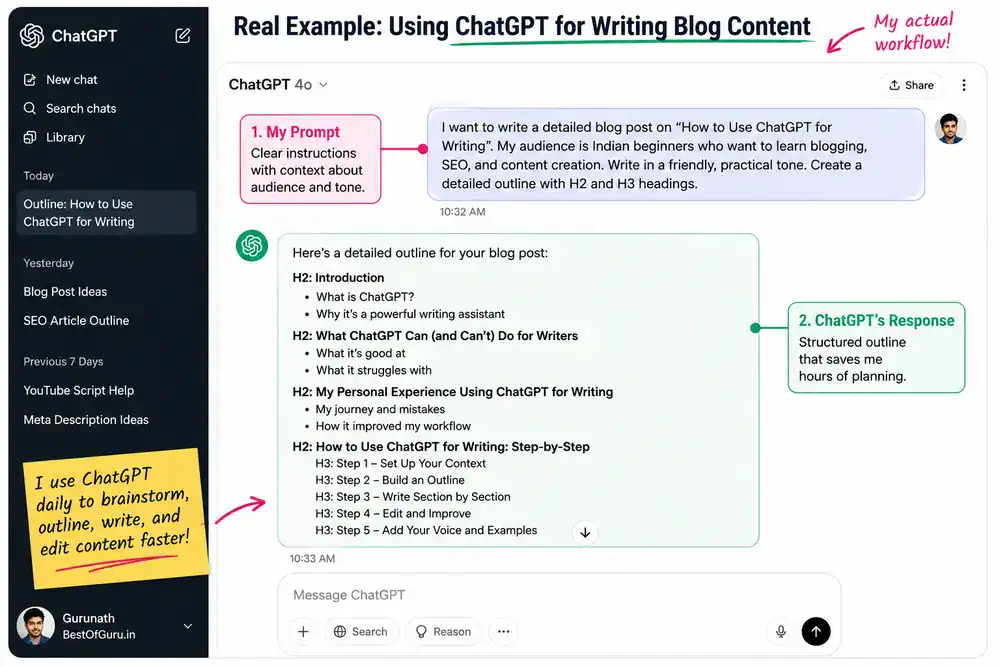
Instead of asking ChatGPT to write the entire article, I first asked it to generate a detailed outline covering:
- What ChatGPT can do for writers
- My personal experience
- Step-by-step instructions
- Prompt examples
- Common mistakes
- FAQs
This gave me a structure to work with.
Step 2: I Reviewed and Improved the Outline
The outline was useful, but it wasn’t complete.
I added sections based on my own experience as a blogger, including:
- The mistakes I made when I first started using ChatGPT
- How I use it for BestOfGuru.in
- My workflow for writing articles faster
Step 3: I Expanded Individual Sections
Instead of generating a 3,000-word article in one prompt, I worked section by section.
For example, I asked ChatGPT to help draft parts of the introduction, prompts section, and FAQ section.
This produced more focused and higher-quality output.
Step 4: I Rewrote and Added Personal Insights
The most important step was editing.
I rewrote several sections in my own style, added real examples, and removed generic wording that didn’t sound natural.
Step 5: Final SEO and Fact Check
Before publishing, I checked:
- Keyword placement
- Internal links
- Heading structure
- Accuracy of claims
- Readability
This process is why I view ChatGPT as a writing assistant rather than an automatic content creator.
How to Use ChatGPT for Writing: Step-by-Step
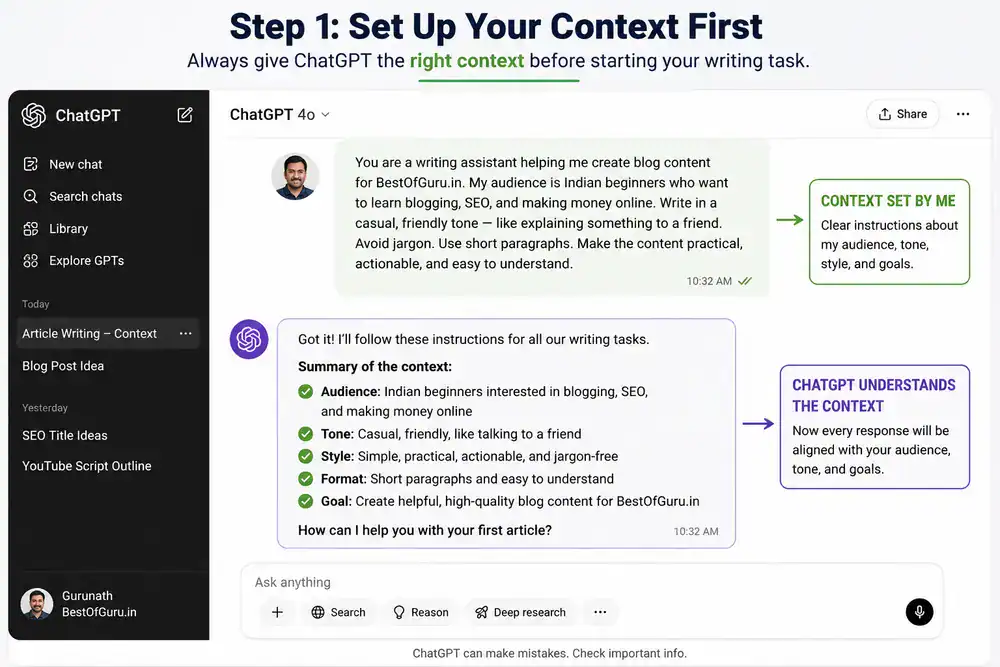
Step 1: Set Up Your Context First
Don’t just open ChatGPT and type your topic. Start by giving it a system context. You can paste this at the beginning of any new chat:
Prompt: “You are a writing assistant helping me create blog content for BestOfGuru.in. My audience is Indian beginners who want to learn blogging, SEO, and making money online. Write in a casual, friendly tone, like explaining something to a friend. Avoid jargon. Use short paragraphs.”
Now every response in that chat will be calibrated to your needs.
Step 2: Use It to Build Your Article Outline
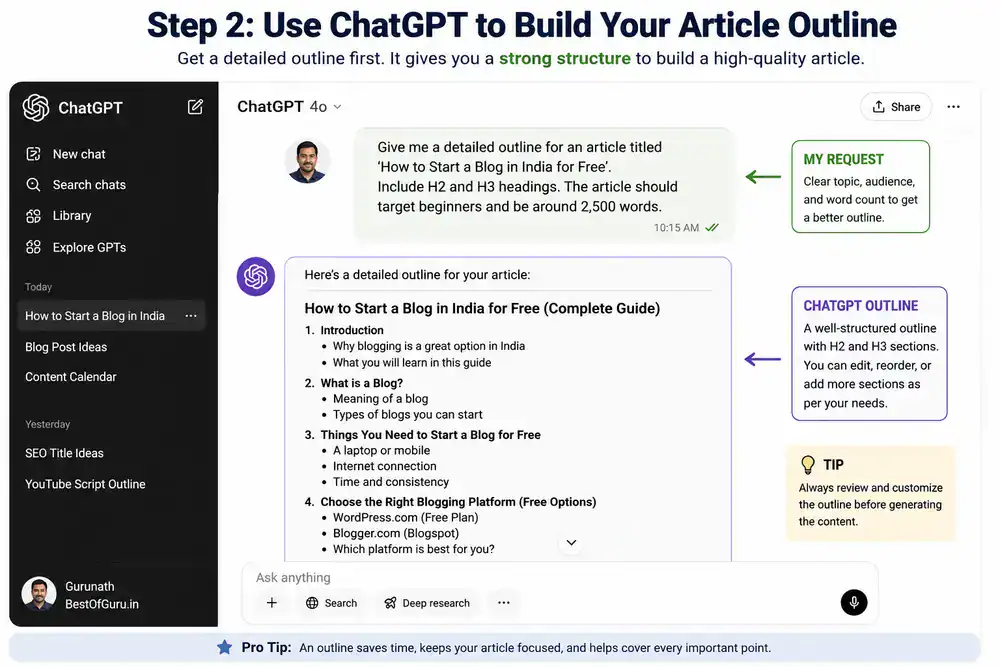
Once context is set, ask for a structure before asking for content.
Prompt: “Give me a detailed outline for an article titled ‘How to Start a Blog in India for Free’. Include H2 and H3 headings. The article should target beginners and be around 2,500 words.”
Review the outline it gives you. Move sections around. Delete what doesn’t fit. Add what’s missing from your own knowledge. Then ask it to write section by section.
Step 3: Write Section by Section, Not the Whole Article
This is the mistake I see new bloggers make: they ask ChatGPT to “write the full article” in one go. The result is a long, repetitive, soulless piece.
Instead, do this:
Prompt: “Write the introduction section for this article. The reader is a complete beginner who’s never blogged before. Hook them in the first two lines. Don’t start with ‘In today’s world’ or similar clichés. Around 150 words.”
Then for the next section:
Prompt: “Now write the section ‘What You Need to Start a Blog in India’ based on the outline above. Include a small comparison table of free vs paid blogging platforms. Keep it beginner-friendly.”
Step 4: Give It Your Raw Notes to Polish
This is one of my favorite uses. I’ll jot down rough notes from my own research or experience, then ask ChatGPT to turn them into a proper paragraph.
Prompt: “Here are my rough notes: [paste your notes]. Turn these into a well-written paragraph for my blog. Keep my original meaning. Make it sound conversational.”
The result reads as you wrote it because the ideas are yours. ChatGPT just cleaned up the language.
Step 5: Rewrite for Clarity and Tone
After any generated section, run a rewrite pass:
Prompt: “Rewrite this paragraph to sound more conversational and less formal. Remove any phrases that sound AI-generated. Make it sound like a real person talking.”
Or for simplifying complex content:
Prompt: “Explain this concept as if you’re talking to someone who has never heard of SEO before. Use a simple analogy.”
Step 6: Generate and Test Headlines
Headlines determine whether anyone clicks. Ask ChatGPT for options:
Prompt: “Give me 10 headline variations for an article about ‘How to Make Money from Blogging in India’. Mix styles — some with numbers, some with questions, some with power words. Target beginner bloggers.”
Pick the one that matches your tone and keyword target. I usually test 2–3 on a draft before committing.
Step 7: Create Your Meta Description
Prompt: “Write a meta description for this article. Focus keyword: ‘how to start a blog in India’. Under 160 characters. Include a soft call to action. Don’t use hype words.”
Before and After: How ChatGPT Improves Writing
One of my favorite uses of ChatGPT is turning rough ideas into clearer content.
Here’s a simple example.
| Before | After |
|---|---|
| Blogging is a good way to make money online if you work hard and write articles regularly. | Blogging can become a reliable income source over time, but success usually comes from publishing useful content consistently and improving your skills along the way. |
Notice what changed:
- Better clarity
- More natural wording
- More specific language
- Improved readability
This is where ChatGPT often provides the most value for writers.
Practical Prompt Examples for Different Writing Tasks
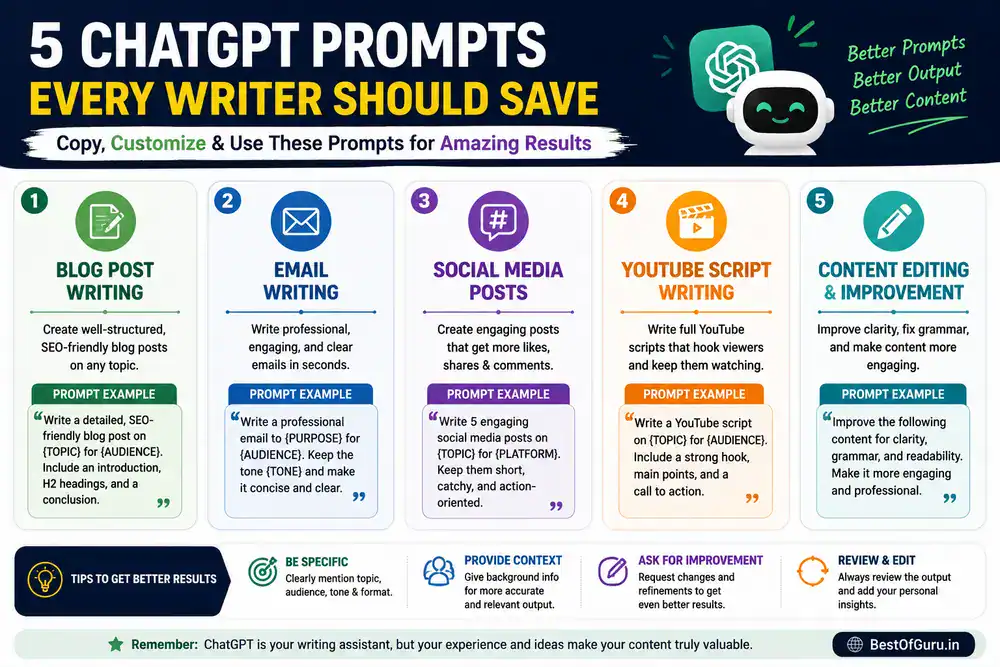
Here’s a cheat sheet of prompts I use regularly:
| Writing Task | Prompt to Use |
| Blog intro | “Write a blog introduction for [topic]. Hook in first line. No clichés. 100–150 words.” |
| FAQ section | “Write 6 FAQs for an article about [topic]. Answer each in 2–4 sentences.” |
| Rewrite for tone | “Rewrite this to sound casual and friendly, like a blogger talking to a reader.” |
| Simplify content | “Explain [concept] in simple terms for a complete beginner. Use an analogy.” |
| Call to action | “Write 3 different CTAs for the end of a blog post about [topic].” |
| Product description | “Write a short product description for [tool/product]. Highlight the top 3 benefits. Under 100 words.” |
| YouTube script intro | “Write a 60-second YouTube intro for a video about [topic]. Energetic but not salesy.” |
| Editing pass | “Edit this paragraph for clarity, grammar, and flow. Keep the meaning intact.” |
How Different Writers Can Use ChatGPT

Not every writer uses ChatGPT in the same way. Here are some practical examples.
Bloggers
Bloggers can use ChatGPT for:
- Content outlines
- Blog introductions
- FAQ generation
- Meta descriptions
- Content updates
Students
Students can use ChatGPT for:
- Research summaries
- Essay planning
- Note organization
- Study guides
Freelance Writers
Freelancers can use ChatGPT for:
- Client content drafts
- Content briefs
- Headline ideas
- Editing assistance
YouTube Creators
Creators can use ChatGPT for:
- Video scripts
- Hook ideas
- Video descriptions
- Content planning
Small Business Owners
Business owners can use ChatGPT for:
- Website copy
- Product descriptions
- Email campaigns
- Customer support templates
Writing Tasks ChatGPT Handles Best
| Writing Task | Can ChatGPT Help? | Human Review Needed? |
|---|---|---|
| Blog Posts | Yes | High |
| Email Writing | Yes | Low |
| Social Media Posts | Yes | Medium |
| Product Descriptions | Yes | Medium |
| YouTube Scripts | Yes | Medium |
| Research Summaries | Yes | High |
| Technical Content | Yes | High |
| Marketing Copy | Yes | Medium |
The more important the content is, the more human review it should receive before publication.
Pros and Cons of Using ChatGPT as a Writing Assistant
✅ Pros
- Saves serious time — What used to take me 3 hours takes 45 minutes now
- Beats writer’s block — Always gives you something to react to and build on
- Flexible — Works for blogs, scripts, emails, product descriptions, and more
- Available 24/7 — No waiting, no scheduling, no creative mood dependency
- Good at structure — Outlines, headings, and flow are usually solid
- Rewriting is excellent — One of its strongest use cases
❌ Cons
- Needs heavy editing — The first output is rarely publish-ready
- Sounds generic by default — You have to work to inject personality
- Can hallucinate facts — Always verify data, stats, and specific claims
- No real-world experience — Can’t tell readers what it was actually like to try something
- Overuses certain phrases — “It’s worth noting,” “In conclusion,” “Dive into” you’ll see them constantly
- Doesn’t know your brand — Takes effort to train it on your voice
One Thing Most Guides Won’t Tell You
The biggest mistake I see bloggers make with ChatGPT is treating the output as done. They paste it in WordPress, do a quick spell-check, and hit publish. I know because I did exactly that on two articles early on, and they got zero traffic.
The issue isn’t that the content is wrong. It’s that it’s empty. No real experience. No specific details. No genuine opinion. Google’s quality systems are increasingly good at identifying content that has words but no substance.
The fix is simple: after ChatGPT gives you a draft, go through it and ask yourself, “Where did I actually learn this? What happened when I tried it? What would I add if I were telling a friend?”
Add those answers. That’s what separates a ranking article from a dead one.
Summary Checklist: Writing with ChatGPT
Use this before you hit publish:
- [ ] Set context/persona at the start of your ChatGPT session
- [ ] Generated and reviewed the outline before asking for content
- [ ] Wrote section by section, not the full article at once
- [ ] Added personal experience, examples, or India-specific context
- [ ] Ran a rewrite pass for tone and naturalness
- [ ] Verified any stats, data, or specific claims independently
- [ ] Removed overused AI phrases (“it’s worth noting,” “dive into,” etc.)
- [ ] Checked focus keyword placement in title, intro, and subheadings
- [ ] Meta description written and under 160 characters
- [ ] Read the full article aloud. Does it sound like a real person?
Does Google Allow AI-Generated Content?
This is one of the most common questions I receive from bloggers.
The short answer is yes.
Google’s focus is on content quality rather than the method used to create it. Whether content is written entirely by a person, assisted by AI, or created using a combination of both, what matters most is whether the content is helpful, accurate, and useful for readers.
From my experience, articles perform better when ChatGPT is used as a tool rather than a replacement for expertise.
For example, ChatGPT can help create outlines, improve clarity, and speed up drafting. However, personal experience, original insights, testing, and real-world examples are still things that only the author can provide.
If your goal is long-term SEO success, use ChatGPT to enhance your workflow, not to eliminate your contribution.
The strongest articles combine:
- Human expertise
- Personal experience
- Original insights
- Accurate information
- AI-assisted efficiency
That’s the approach I follow when creating content for BestOfGuru.in.
Frequently Asked Questions
Q1: Can I use ChatGPT to write full blog posts?
Yes, but with an important caveat, you shouldn’t publish the raw output directly. Use ChatGPT to write first drafts or individual sections, then rewrite in your own voice, add personal experience, and verify any facts. The final article should feel like you wrote it, with ChatGPT doing the heavy lifting on structure and language.
Q2: Is content written with ChatGPT penalized by Google?
Google has said it doesn’t penalize AI-written content, but it penalizes low-quality, unhelpful content. If you use ChatGPT to produce thin, generic articles with no real value, those will struggle to rank. If you use it as a writing assistant and add genuine expertise and experience on top, the content can rank well. The quality of the final output is what matters.
Q3: What are the best ChatGPT writing prompts for bloggers?
The most effective prompts are specific and contextual. Instead of “write a blog post about SEO,” try “write the introduction section of a 2,500-word beginner’s guide to SEO for Indian bloggers. Keep it casual and avoid jargon. Hook the reader in the first two lines.” Specificity is everything.
Q4: How do I make ChatGPT write in my personal style?
Start each session by describing your voice: “Write in a casual, conversational tone like a blogger explaining to a friend. Use short paragraphs, simple words, and occasional humor. Avoid formal language.” You can also paste a sample of your own writing and ask it to match that style. Over time, you’ll develop a few context-setting prompts that consistently work for you.
Q5: Can ChatGPT help with writing YouTube scripts?
Absolutely. It’s one of my favorite use cases. I give it the topic, the target audience, the video length, and the tone, and ask for a full script with hook, main content, and call to action. The scripts still need editing for my delivery style, but the structure saves a lot of time. YouTube intro writing, especially, is something ChatGPT handles really well.
Q6: Is ChatGPT free to use for writing?
ChatGPT has a free tier that gives you access to the GPT-3.5 model, which is capable of most writing tasks. The paid ChatGPT Plus plan (around $20/month, roughly ₹1,700) gives you access to GPT-4 and GPT-4o, which produce noticeably better writing, more nuanced, more accurate, and better at following complex instructions. For serious bloggers, the paid plan is worth it.
Related ChatGPT Guides
If you’re learning how to use ChatGPT more effectively, these guides may help:
- How to Use ChatGPT
- How to Use ChatGPT in Excel
- How to Use ChatGPT for Blogging
- How to Use ChatGPT for SEO
- Best ChatGPT Prompts for Bloggers
Together, these tutorials will help you get more value from ChatGPT for content creation, productivity, and business growth.
Conclusion
Learning how to use ChatGPT for writing changed how I work, but not because it writes for me. It changed things because it removed the part of writing I always found hardest: staring at a blank page.
Now I start with context, get a structure, work section by section, and then do what I actually enjoy, shaping the content, adding my experiences, and making it feel like a real guide from a real person.
If you’re just starting with ChatGPT as a writing assistant, start small. Pick one section of your next article, maybe the FAQ, or the introduction, and try writing it with ChatGPT’s help. See how it feels. Adjust your prompts. Get comfortable with the back-and-forth.
You’ll find your own workflow pretty quickly. And once you do, you’ll wonder how you used to write without it.
Have questions about writing with ChatGPT? Drop them in the comments. I read everyone.
If there’s one thing I hope you take away from this guide on how to use ChatGPT for writing, it’s that AI works best when combined with human experience, expertise, and creativity.